Choose your TalkOps
TalkOps (talkops / ops) is an open-source, multi-agent DevOps, SRE, and Cloud Engineering framework built on LangGraph and powered by TypeSafe AI Jev Smart Mode (<70ms prompt routing, <100ms 0-token System-One safety gate, and <200ms rubric grading). Run interactive investigations in your terminal, deploy a centralized multi-tenant server for your platform team, automate 24/7 incident triage across 9 webhook providers, or gate CI/CD pipelines with rubric-graded checks.
Select any surface below to explore live interface previews, core workflows, and quickstart paths:
Launch a rich Textual terminal interface directly in your shell. Switch between Jev Smart Mode and Manual mode in real time (Shift+Tab or /smart), delegate investigations to specialist cloud subagents, fuzzy-search 30+ /slash commands, and switch AWS, Azure, GCP, and Kubernetes contexts without leaving your terminal.
- Live token, cost, cache-hit, and active cloud context telemetry bar
- Interactive /pool, /model, /cloud, /plugins, and /permissions modals
- Inline Human-in-the-Loop (HITL) approval cards with blast-radius tags
Core agent capabilities
Every TalkOps surface shares a single LangGraph orchestration runtime, deterministic System-One safety gate, and composable DevOps plugin ecosystem.
Jev Smart Mode
<70ms Routing · <100ms SafetyPowered by TypeSafe AI Jev: routes every prompt across your Fast, Standard, and Powerful model tiers in <70ms (cutting token costs 80–90%) while checking every proposed shell or cloud mutation in <100ms using 0 LLM tokens.
Specialist DevOps subagents
Parallel delegationSpawns isolated specialist subagents in parallel for Kubernetes, AWS, Azure, GCP, Terraform, FinOps, and security audits—each with its own model tier, system instructions, and scoped MCP/CLI tools.
Goals, rubrics & memory
<200ms VerificationRuns autonomous multi-turn convergence loops (--goal, /goal) and grades acceptance criteria (--rubric, /rubric) in <200ms, backed by persistent AGENTS.md memory and SKILL.md runbooks.
Fail-closed safety & sandboxes
Bounded accessEnforces deterministic PreToolUse / PostToolUse lifecycle hooks, --read-only dry-run locks, scoped /permissions, and isolated execution in Modal, Daytona, Runloop, LangSmith, AgentCore, Vercel, or Docker sandboxes.
Plugin Marketplace, Domain Agents & Open-Source MCP Ecosystem
40 Plugins · 10 MCP ServersInstall domain-ready DevOps capabilities in a single command (talkops plugin install <name> or /plugins). Includes 17 AWS specialist subagents, 21 vertical SRE & platform bundles, OpsCode, the Autonomous Kubernetes Agent, and 10 open-source MCP servers for Kubernetes, Helm, ArgoCD, Argo Rollouts, Prometheus, Alertmanager, Loki, Tempo, OpenTelemetry, Traefik, and Terraform.
Multi-provider models and Jev Smart Mode
Bring your own API keys across 26+ built-in cloud and local LLM providers (provider:model), or let Jev Smart Mode dynamically route every turn across your 3-tier model pool (/pool).
Log Summarization, Routing & Read-Only Checks
Handles quick status checks (kubectl get pods, git status), initial triage, and fast inspection.
claude-haiku-4-5gemini-3.8-flashdeepseek-v4.1-flashollama:qwen2.5-coderKubernetes, Cloud CLI & Terraform Operations
Executes multi-step tool chains, Helm/ArgoCD diagnostics, IAM policy audits, and routine infrastructure remediations.
claude-sonnet-5gpt-5.6-lunagpt-5.3-codexdeepseek-v4-proCross-Region RCA, Architecture & Security Audits
Reserved for high-complexity outage correlation, multi-cloud migrations, and rubric-verified architectural changes.
claude-opus-5-5gpt-6-astragemini-3.1-pro-previewo3-pro / grok-4.5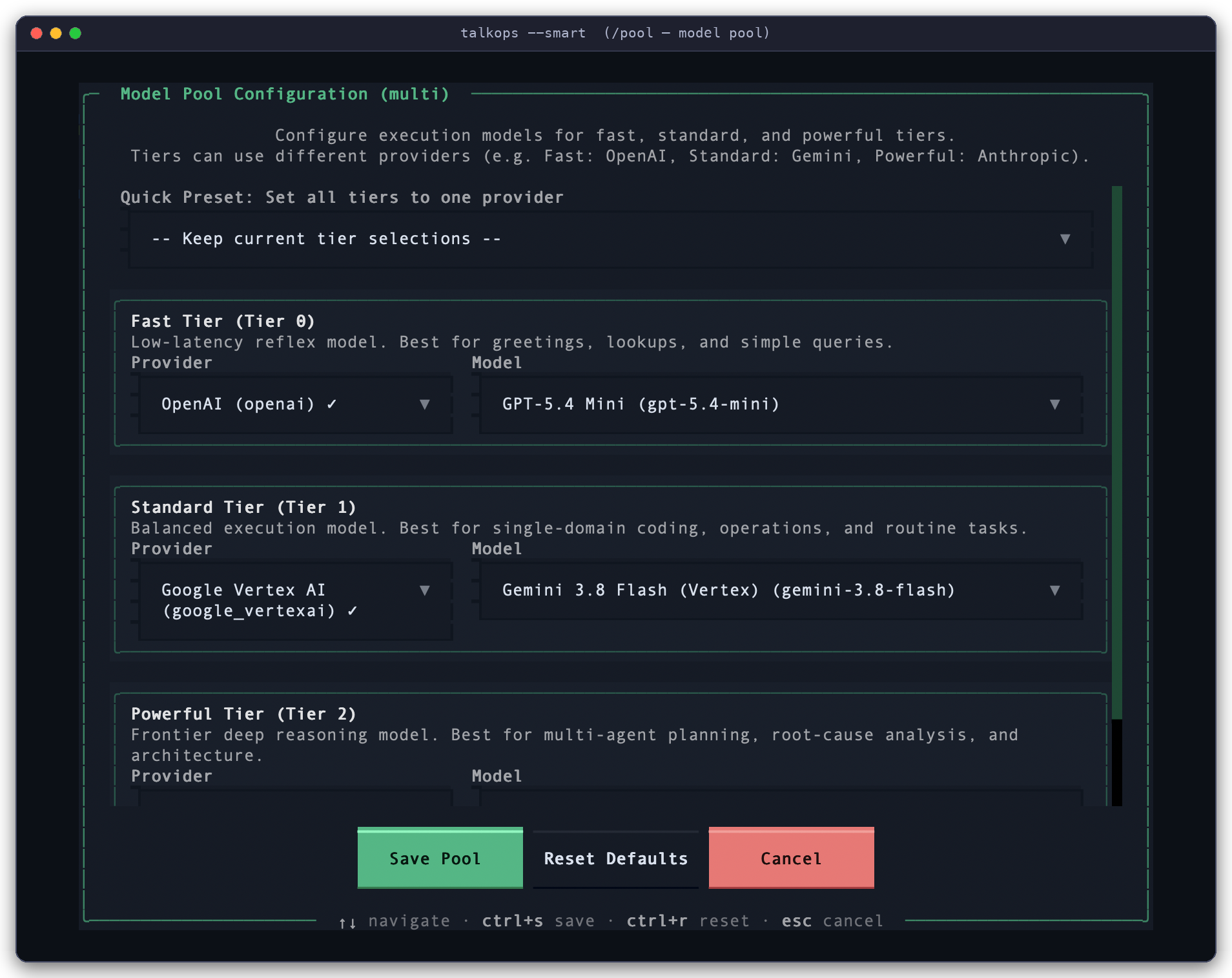
Surface comparison
Compare capabilities across TalkOps runtime surfaces and click any feature to jump directly to its documentation.
Individual and platform team deployments
Start locally on your laptop in 60 seconds with zero external infrastructure, then scale to a centralized multi-tenant server for your entire engineering organization.
Zero Infrastructure Setup
Install via uv tool install --prerelease=allow talkops-ai or install.sh. Sessions and checkpoints persist locally in SQLite under ~/.talkops/.state/sessions.db.
Native Workstation Credentials
Automatically reuses your existing ~/.aws, ~/.kube/config, gcloud, and az CLI sessions without copying secrets.
Bring Your Own Models (26+ Providers)
Connect Anthropic, OpenAI, Gemini, Bedrock, DeepSeek, Groq, xAI, or run 100% offline and air-gapped with local Ollama or vLLM.
Interactive HITL & Scoped Permissions
Review proposed shell commands and infrastructure edits inline with [y/n/e] approval cards, configure /permissions, or lock sessions with --read-only.
Documentation pillars
Explore the complete TalkOps documentation organized by operational pillar.
Quickstart, Auth & CLI Reference
Install TalkOps in 60 seconds, verify cloud & LLM credentials with talkops doctor, and master every CLI flag and /slash command.
Jev Smart Mode, Approvals & Sandboxes
Configure <70ms tier routing, <100ms 0-token blast-radius gating, --goal / --rubric loops, and isolated remote sandboxes.
Central Server, Add-ons & 9 Webhook Providers
Run talkops serve with persistent threads, signed JWT auth, microkernel add-ons, and automated Slack/ServiceNow/PagerDuty RCA triage.
85+ Settings, config.toml & 26+ LLM Providers
Understand the 4-layer configuration hierarchy, declarative config.toml schema, 3-tier model pools, and cloud credential chains.
Subagents, Memory, Skills, Plugins & Hooks
Author custom YAML subagents, persistent AGENTS.md memory, SKILL.md runbooks, custom /commands, MCP tools, and lifecycle hooks.
40 Marketplace Plugins, OpsCode & K8s Agent
Browse 17 AWS specialist subagents, 21 vertical DevOps bundles, OpsCode, Kubernetes Agent, and 10 open-source MCP servers.
Quickstart in 60 seconds
1. Install TalkOps
curl -LsSf https://raw.githubusercontent.com/talkops-ai/talkops/main/scripts/install.sh | bash
Alternative installation methods (uv, pipx, pip, or pinned version)
# Using uv (recommended for Python 3.12+ environments)
uv tool install --prerelease=allow talkops-ai

# Using pipx
pipx install --pip-args="--pre" talkops-ai

# Using pip
pip install --pre -U talkops-ai

# Install a specific version via install.sh
curl -LsSf https://raw.githubusercontent.com/talkops-ai/talkops/main/scripts/install.sh | bash -s -- 0.3.0b17
2. Add a Model Key and Verify
talkops auth set anthropic       # prompts for the key (or: export ANTHROPIC_API_KEY=...)
export TYPESAFE_API_KEY=...      # optional: enables Jev Smart Mode; without it, Smart Mode asks before every tool call
talkops doctor                   # check AWS identity, cloud/DevOps CLIs, Python runtime, and logging
3. Run TalkOps (TUI, Headless CLI, or Server Mode)
You can invoke TalkOps using either talkops or the ops shorthand alias:
# 1. Interactive Terminal UI (TUI)
talkops --smart                  # or: ops --smart

# 2. Headless CLI Mode (for shell scripts & CI/CD pipelines)
talkops -p "Audit AWS resources in ap-south-1 for unused volumes and cost savings" --smart

# 3. Central Server Mode (start the server, then connect from a terminal or CI client)
talkops serve --host 0.0.0.0 --port 2024
talkops --server-url http://localhost:2024 --api-key oc_live_... --user-id alice
What You Can Do with TalkOps
Day-to-day engineering usually means jumping between code editors, cloud consoles, Kubernetes terminals, CI/CD logs, and billing dashboards. TalkOps lets you handle all of those from one place:
| Area | How TalkOps Helps |
|---|---|
| Writing & Reviewing Code | Writes, updates, and debugs application code, scripts, and config files; runs tests; and checks git changes with /review. |
| Cloud Management (AWS, Azure, GCP) | Inspects and troubleshoots cloud resources—servers, networks/VPCs, databases, storage, and IAM permissions—using your existing cloud login (/cloud). |
| Kubernetes & Containers | Writes Dockerfiles, manages EKS/AKS/GKE clusters and Helm charts, and quickly finds why pods are crashing (CrashLoopBackOff, OOMKilled) or why networking is slow. |
| Terraform & CI/CD Pipelines | Writes and validates Terraform, OpenTofu, CDK, CloudFormation, and Ansible files; checks for configuration drift; and fixes broken GitHub Actions or Jenkins builds. |
| Incident Response & Monitoring | Searches logs and metrics across Prometheus, Loki, Datadog, and CloudWatch; investigates live alerts; and posts clear summaries back to PagerDuty, ServiceNow, Slack, Discord, or Teams. |
| Cloud Cost (FinOps) & Security | Finds unused disks, idle load balancers, and oversized servers to lower your cloud bill, and checks IAM permissions and security findings for risks. |
How TalkOps Works
1. Four ways to run it
Whether you run TalkOps on your laptop, in a script, or on a team server, it uses the same tools, skills, and safety rules:
| Mode | Command | When to Use It |
|---|---|---|
| Interactive Terminal (TUI) | talkops --smart (or ops --smart) | Everyday work on your laptop: debugging clusters, writing Terraform, reviewing code, and exploring cloud resources. |
| One-Off Command / CI Mode | talkops -p "<question>" --smart | Running automated checks in GitHub Actions, GitLab CI, Jenkins, or shell scripts without opening an interactive window. |
| Shared Team Server | Server: talkops serve --port 2024Client: talkops --server-url http://host:2024 | Sharing cloud credentials and conversation history across a team so multiple engineers can collaborate. |
| Live Alert Receiver (Webhooks) | POST http://host:2024/webhooks/{provider} | Automatically investigating alerts from PagerDuty, Alertmanager, Datadog, AWS SNS, ServiceNow, Jenkins, or GitHub 24/7. |
2. Smart Mode: Balancing cost, speed, and safety
Using the largest, most expensive AI model for every simple status check wastes money and time—but using a small model all the time fails when you hit a tough outage. Similarly, being asked to approve every harmless read-only command (kubectl get pods) slows you down, while auto-approving everything is dangerous in production.
Turning on Smart Mode (talkops --smart, /smart, or pressing Shift+Tab) solves both:
- Picks the right model for each question:
- Fast model for quick status checks (
git status,kubectl get pods), cutting AI costs by 80–90%. - Standard model for everyday coding and configuration tasks.
- Powerful model for complex outages, multi-region audits, and architecture design.
- Fast model for quick status checks (
- Checks every command for safety before running:
- Safe, read-only checks run automatically without interrupting you.
- Risky or production-changing commands (like deleting resources or applying changes) pause and ask for your confirmation (
[y/n/e]).
You can mix and match models from 26+ AI providers across your Fast, Standard, and Powerful slots at any time by running /pool:
Choosing Your Smart Mode Models (/pool): Assign a fast model for simple tasks, a balanced model for everyday work, and a top reasoning model for complex investigations.
3. Specialist agents, plugins, skills, and sandboxes
Instead of trying to do everything in one giant conversation, TalkOps can bring in specialized helpers and tools when needed:
- Specialist Subagents (
/agent,talkops agents): When a task involves a specific area—like auditing AWS S3 security or debugging an EKS cluster—TalkOps can hand that piece of work off to a specialist agent. The specialist runs the detailed checks and reports back a clean summary so your main chat stays easy to read. - One-Click Plugins (
/plugins,talkops plugin): Install pre-built specialist agents (such asaws-sre-agent,aws-finops-agent,aws-iac-engineer, oraws-cloud-security-engineer) and skill packs from the official TalkOps Marketplace or your own team's Git repository. - Saved Memory & Runbooks (
/memory,/remember,talkops skills): Tell TalkOps what to remember about your project (AGENTS.mdor/remember), or save step-by-step team troubleshooting guides as reusableSKILL.mdrunbooks. - External MCP Tools (
/mcp,talkops mcp): Connect external tool servers (using the Model Context Protocol) from.mcp.jsonorconfig.tomlto give TalkOps access to internal APIs, docs, or databases. - Isolated Sandboxes (
[sandboxes]): Optionally run commands inside isolated Docker, Modal, Daytona, Runloop, or cloud containers instead of directly on your machine.
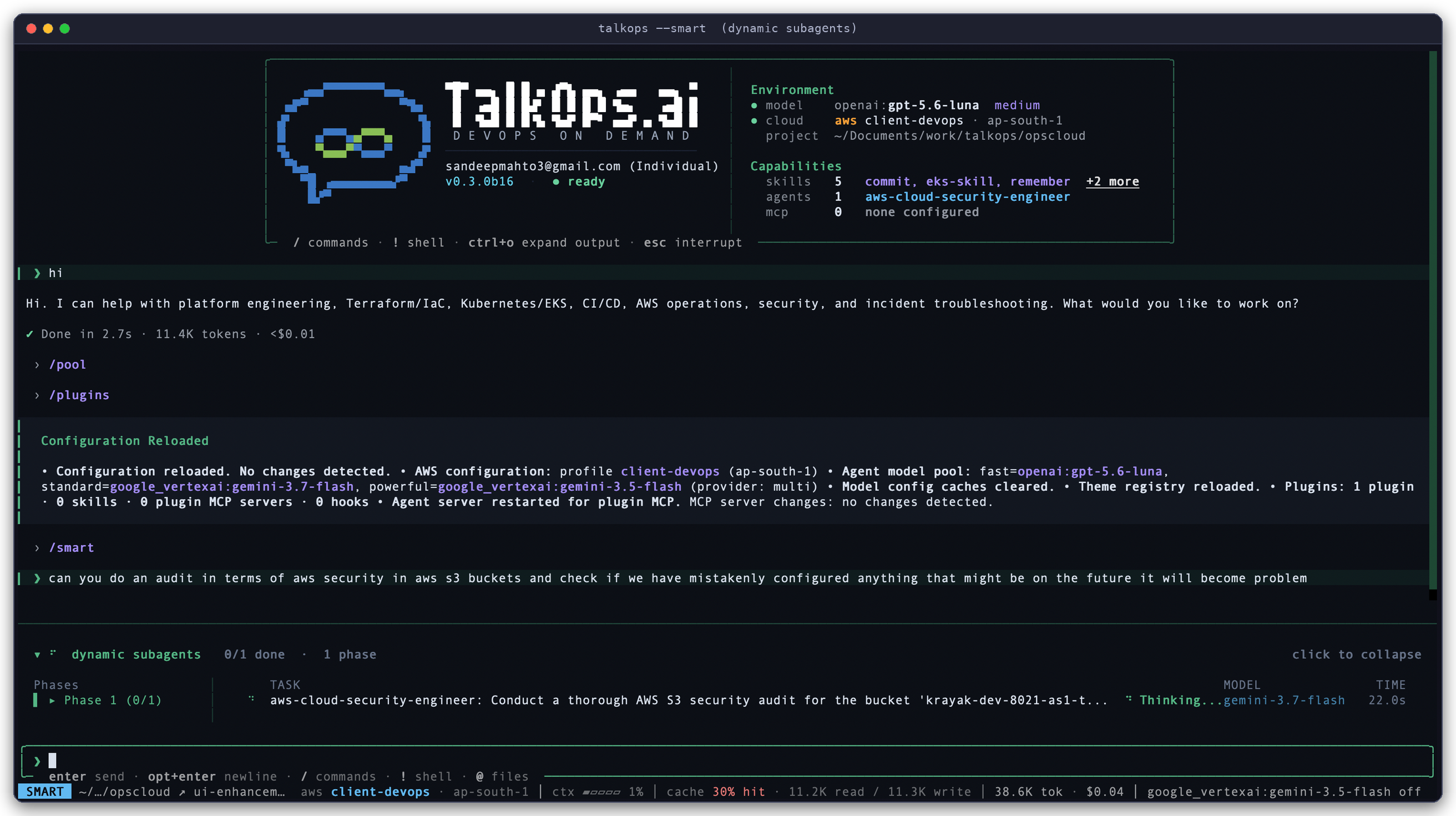
Specialist Agent in Action: Running in SMART mode on AWS profile client-devops (ap-south-1), where TalkOps delegates an S3 security check to aws-cloud-security-engineer and returns a clear summary.
| Feature | How to Use It | Learn More |
|---|---|---|
| Marketplace Plugins | /plugins or talkops plugin install <name> | Plugins & Marketplaces |
| Specialist Subagents | /agent or talkops -a <name> | Subagents |
| Team Runbooks & Memory | /skills, /memory, /remember | Memory & Skills |
| Custom Slash Shortcuts | Create .md files in .talkops/commands/ | Custom Commands |
| External MCP Tools | /mcp or talkops mcp list | MCP Tools |
| Server Addons | talkops serve addons or talkops addon list | Server Addons |
| Automated Hooks | Configure [[hooks]] in config.toml | Hooks |
| Container Sandboxes | /config sandbox.provider docker | Remote Sandboxes |
Where to Go Next
Getting Started
- Quickstart — Install TalkOps, connect your first AI model and cloud account, and run your first task in 5 minutes.
- CLI & Slash Command Reference — Easy lookup guide for terminal commands and in-chat
/slashcommands.
Running TalkOps with Your Team
- Approval Modes & Smart Mode — Understand Manual, Smart, and Auto approval modes.
- Central Server & Team Collaboration — Set up
talkops serveso your team can share sessions and cloud access. - Webhooks & Automated Alerting — Connect PagerDuty, Alertmanager, Datadog, AWS SNS, ServiceNow, Jenkins, and GitHub alerts.
- Goal Mode & Rubrics — Give TalkOps a multi-step goal (
/goal) or success checklist (--rubric) to work through until finished.
Configuration & Customization
- Configuration Guide &
config.tomlReference — Customize your default settings, cloud profiles, and safety rules. - Credentials & Authentication & Model Providers — Connect any of the 26+ supported AI providers and cloud accounts.
- Subagents, Memory & Skills, & Plugins — Tailor TalkOps to your team's infrastructure and workflows.
Event-Driven Webhooks & 9 Built-In Alert Providers
When running talkops serve, TalkOps exposes /webhooks/{provider} to receive live production alerts, deduplicate alert storms into a single ongoing investigation thread, and deliver Root Cause Analysis (RCA) reports back to your ticketing, source control, and chat platforms:
| Provider | Supported Alert Sources | Security Verification | Automated Write-Back & Notifications |
|---|---|---|---|
pagerduty | PagerDuty v3 Incident Webhooks | PagerDuty HMAC signature check | Posts RCA report directly to PagerDuty Incident Notes + chat channels |
servicenow | ServiceNow ITSM (snow, itsm) | Bearer token or shared secret | Adds RCA report to ServiceNow Incident work_notes + chat channels |
github | GitHub Actions workflow_run, Issues, PRs | GitHub HMAC signature check + ping handshake | Posts RCA comment directly on the GitHub PR or Issue + chat channels |
sns | AWS SNS & CloudWatch Alarms | Automatic AWS subscription confirmation | Sends RCA report to Slack, Discord, Teams, and custom callback_url |
alertmanager | Prometheus Alertmanager groups | Shared secret or bearer token | Sends RCA report to Slack, Discord, Teams, and custom callback_url |
datadog | Datadog Monitors & Synthetics (dd) | Shared secret or bearer token | Sends RCA report to Slack, Discord, Teams, and custom callback_url |
cloudevents | CNCF CloudEvents 1.0 (Argo Events, Knative, Keptn) | Shared secret or bearer token | Sends RCA report to Slack, Discord, Teams, and custom callback_url |
jenkins | Jenkins Pipeline & Build notifications | Jenkins webhook token | Sends RCA report to Slack, Discord, Teams, and custom callback_url |
generic | azure-monitor, opsgenie, jira, argocd, gitlab, custom | GitLab token, shared secret, or URL token | Sends RCA report to Slack, Discord, Teams, and custom callback_url |
See the Webhooks & Event-Driven Automation Guide for payload formats, signature setup, and write-back configuration.
CLI Subcommands & Interactive Slash Commands
Every TalkOps workflow can be run from your terminal (talkops or ops) or interactively inside the TUI using / slash commands. For the complete flag and command reference, see the CLI & Slash Command Reference.
talkops auth — Manage Control Plane SSO/JWT sessions, provider API keys & AWS identity
talkops auth status                                                    # Inspect session lease, LLM providers & AWS STS status
talkops auth login --sso                                               # Authenticate via Browser SSO (PKCE)
talkops auth login --server-url http://host:2024 --api-key oc_live_... # Exchange an API key for a signed JWT session
talkops auth list                                                      # List all 26+ LLM providers and credential status
talkops auth set anthropic sk-ant-...                                  # Store a provider API key in OS keychain
talkops auth aws --profile prod-admin --region us-east-1               # Verify AWS STS caller identity
talkops threads, talkops mcp, talkops plugin, talkops addon, talkops skills & talkops agents
# Saved conversation threads (local SQLite or remote Central Server)
talkops threads list
talkops threads list --server-url http://talkops.internal:2024 --user-id alice

# Model Context Protocol (MCP) tool servers
talkops mcp list
talkops mcp probe

# DevOps & AWS Marketplace Plugins
talkops plugin list
talkops plugin install aws-finops-agent

# Central Server Addons
talkops addon list
talkops addon install channels

# Reusable SKILL.md Runbooks & Specialist Subagents
talkops skills list
talkops skills create eks-node-drain
talkops agents list
Interactive TUI /slash Commands by Category
| Category | Available Slash Commands & Aliases |
|---|---|
| Approval & Safety | /smart, /auto, /manual, /permissions |
| Models & Smart Pool | /model, /pool (/agent-pool), /effort, /fast |
| Cloud, Code & Goals | /cloud (/aws, /azure, /gcp, /k8s), /review (/code-review), /goal, /rubric (/criteria), /trace, /doctor |
| Sessions & Context | /threads (/resume, /continue), /fork (/branch), /compact (/offload), /context, /cost (/tokens), /clear, /force-clear, /copy, /btw (/aside), /tasks, /loop, /exit (/quit, /q) |
| Agents, Skills, Plugins & MCP | /agent (/agents), /agent:<name>, /skills (/tools), /skill:<name>, /skill-creator, /plugins, /mcp, /memory, /remember |
| Config, Auth & UI | /config, /login (/auth, /connect), /logout, /reload, /restart, /install, /update, /auto-update, /theme, /notifications, /timestamps, /scrollbar, /version, /bug (/feedback), /help |
Complete Documentation Directory
| Category | Guide | What It Covers |
|---|---|---|
| Getting Started | Overview | System architecture, Jev Smart Mode, Central Server, Webhooks, and subagent coordination |
| Quickstart | Install TalkOps in 60s, run local or remote sessions, and complete your first DevOps task | |
| Authenticate & Credentials | Managing 26+ LLM API keys, server tokens, AWS/Azure/GCP credentials, and webhook secrets | |
| Choose a Model | Setting up all 26+ supported providers (Anthropic, OpenAI, Gemini, Bedrock, Azure, Vertex, DeepSeek, Groq, xAI, OpenRouter, Ollama, LiteLLM) and /pool | |
| CLI & Slash Command Reference | Complete guide to every CLI subcommand, flag, and interactive /slash command | |
| Core Operations, Server & Safety | Smart Mode & Approvals | How 3-tier model routing (<70ms) and 0-token tool safety checks (<100ms) work |
| Central Server | Running talkops serve, persistent thread storage, user authentication, and team connections | |
| Server Add-ons | Server profiles (default, api-only, webhook-worker, enterprise-full), built-in addons, and custom addon marketplaces | |
| Webhooks & Incident Triage | Receiving PagerDuty, Alertmanager, Datadog, SNS, CloudEvents, ServiceNow, Jenkins, and GitHub alerts with automated RCA reports | |
| Goals & Rubrics | Multi-step task completion with <200ms automatic checklist verification (/goal, /rubric, --goal, --rubric) | |
| Remote Sandboxes | Running commands safely inside isolated Modal, Daytona, Runloop, LangSmith, AgentCore, Vercel, or Docker sandboxes | |
| Configuration | Configuration Overview | How 85+ settings resolve across CLI flags, environment variables, config.toml, and config.db |
config.toml Reference | Full reference for cloud, Kubernetes, DevOps, model, security, sandbox, and webhook settings | |
| Extend & Customize | Subagents | Using built-in/plugin subagents and creating custom .talkops/agents/*.md specialists |
| Memory & Skills | Persistent AGENTS.md project memory and reusable SKILL.md operational runbooks | |
| Custom Commands | Creating custom project and personal slash commands in .talkops/commands/ | |
| Plugins & Marketplaces | Installing and packaging skills, subagents, hooks, and MCP servers | |
| MCP Tools | Connecting external stdio, sse, and http Model Context Protocol tool servers | |
| Lifecycle Hooks | Running custom scripts automatically on session start, before/after tool calls, and on webhook events | |
| Add-on Developer Guide | Building custom Python ServerAddon plugins with FastAPI routes, AgentRunGateway, and HookEventBus |
Operational Safety & Security Disclosure
- Fail-Closed Guardrails: TalkOps requires explicit human approval in
Smart ModeandManual Modewhenever an action modifies production resources or carries a high impact risk. Always test custom.talkops/skills/runbooks, plugins, and MCP servers in a non-production environment or isolated sandbox (Remote Sandboxes) before enabling unattended execution in production. - Untrusted Webhook & Log Inputs: Incoming webhook payloads, log streams, and external repository files enter the agent's context and should be treated as untrusted input. Always enable webhook signature/token verification on
talkops serveand scope cloud IAM roles to least privilege.