Webhooks & Automated Incident Response
Turn live alerts from PagerDuty, Datadog, Prometheus, AWS, ServiceNow, and GitHub into clear root-cause reports—posted automatically to your tickets and chat channels.
When a production alert goes off at 3 AM or a deployment fails, an on-call engineer usually spends the first 15 to 30 minutes just gathering facts: checking which servers or containers crashed, reading recent logs, seeing what code or configuration changed recently, and posting updates in Slack or PagerDuty.
TalkOps Webhooks automate that entire first-responder step. When you run TalkOps in server mode (talkops serve), your monitoring, ticketing, and CI/CD tools can send alerts directly to TalkOps. Within seconds, TalkOps starts a safe investigation, finds the root cause, and posts a clear Root Cause Analysis (RCA) report back to your team in Slack, Microsoft Teams, Discord, PagerDuty, ServiceNow, or GitHub.
Works with Your Existing ToolsConnects out of the box with PagerDuty, Prometheus Alertmanager, Grafana, AWS SNS/CloudWatch, Datadog, ServiceNow, GitHub, Jenkins, Azure Monitor, Opsgenie, Jira, Argo CD, and GitLab. | Stops Alert Storms & Wasted SpendIf a major outage triggers dozens of identical alerts in a few minutes, TalkOps automatically groups them and runs one investigation instead of paying for 50 duplicate AI runs. |
One Continuous Thread per IncidentIf an outage evolves—or if an engineer adds a note in PagerDuty—TalkOps routes the new information into the same ongoing investigation so full context is preserved. | Updates Chat & Tickets AutomaticallyPosts an immediate |
How Automated Incident Triage Works
When an alert is sent to TalkOps (/webhooks/{provider}), it goes through five simple steps:
- Verifies the sender: Checks the security secret or signature from PagerDuty, GitHub, Datadog, or your monitoring tool to make sure the alert is genuine.
- Filters out noise and duplicates:
- Ignores recovery messages: When an alert flips back to
"OK"or"Resolved", or when a CI build passes, TalkOps skips it so you only spend AI budget on actual problems. - Blocks alert storms: Repeated alerts for the same issue within 5 minutes (
300sby default) are automatically deduplicated, and TalkOps caps how many investigations can run at the exact same time (5by default).
- Ignores recovery messages: When an alert flips back to
- Keeps related events together: Every incident ID is linked to a saved conversation thread. If 5 cascading alerts fire for the same outage, TalkOps adds them to the existing investigation instead of starting over from scratch.
- Runs a safe investigation: TalkOps inspects logs, metrics, Kubernetes pods, cloud resources, and recent deployments using your configured safety mode (Smart Mode or Read-Only Mode).
- Posts the findings where your team works: As soon as the investigation finishes, TalkOps writes a clean summary and remediation plan back to your chat channel and incident ticket.
What Your Team Sees in Slack, Discord, or Teams
When you connect a chat channel (TALKOPS_WEBHOOK_NOTIFY_CHANNELS), your team gets a clean, two-step update without cluttering the main channel:
- Stage 1 (Main Channel Card): As soon as the alert arrives, TalkOps posts an incident summary card showing
Status: Investigating.... When the investigation finishes, TalkOps updates that same card in place toRCA Complete (in thread)and adds a Root Cause Takeaway summary. - Stage 2 (Detailed Thread Reply): Inside the message thread, TalkOps posts the complete Automated RCA report—including the executive summary, affected scope matrix, diagnostic evidence, and recommended fix.
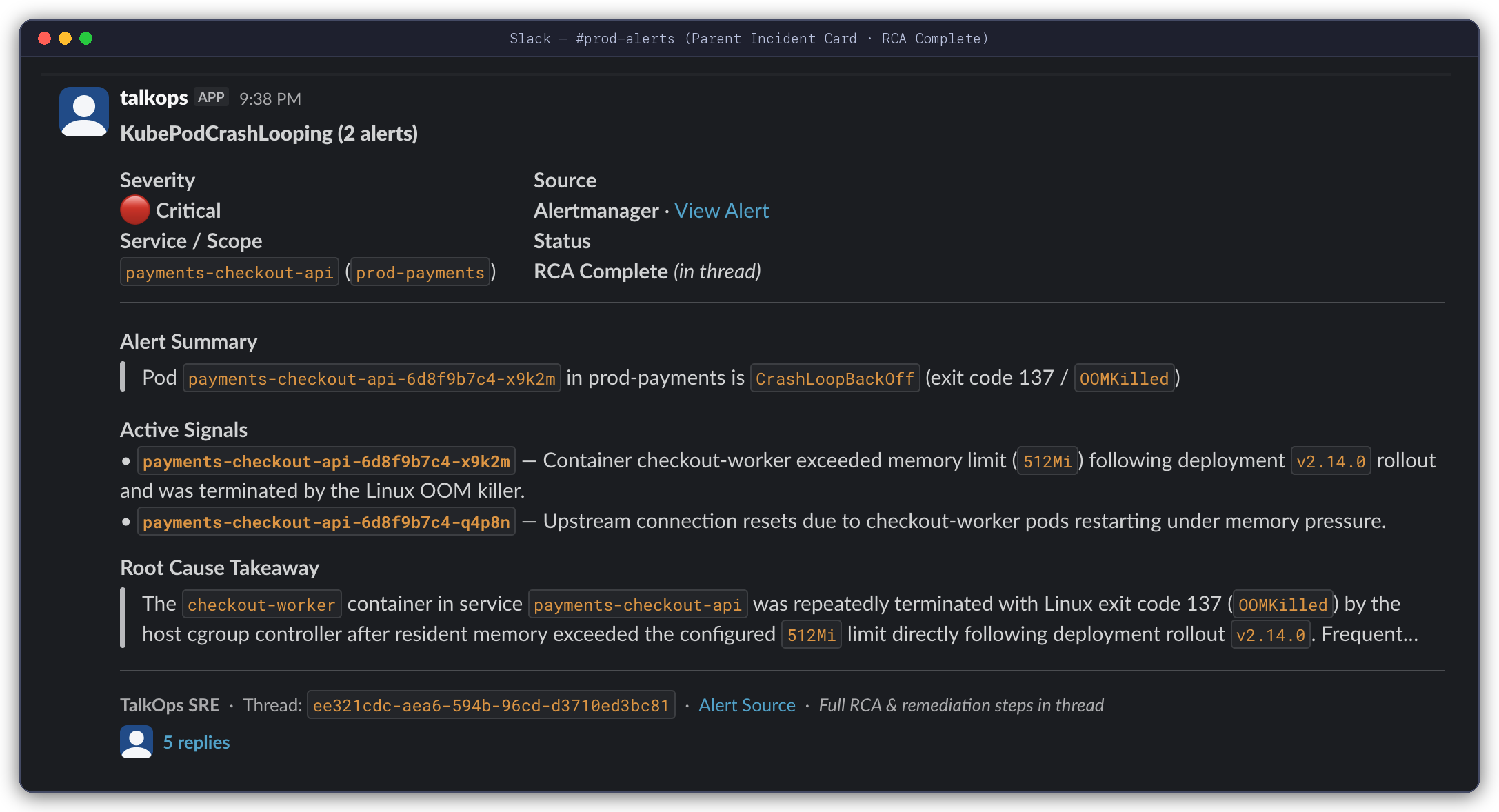
Stage 1 — Incident Card in the Main Channel: TalkOps summarizes the incoming alert, lists the active failure signals, updates the status to RCA Complete (in thread), and highlights the Root Cause Takeaway right on the main card.
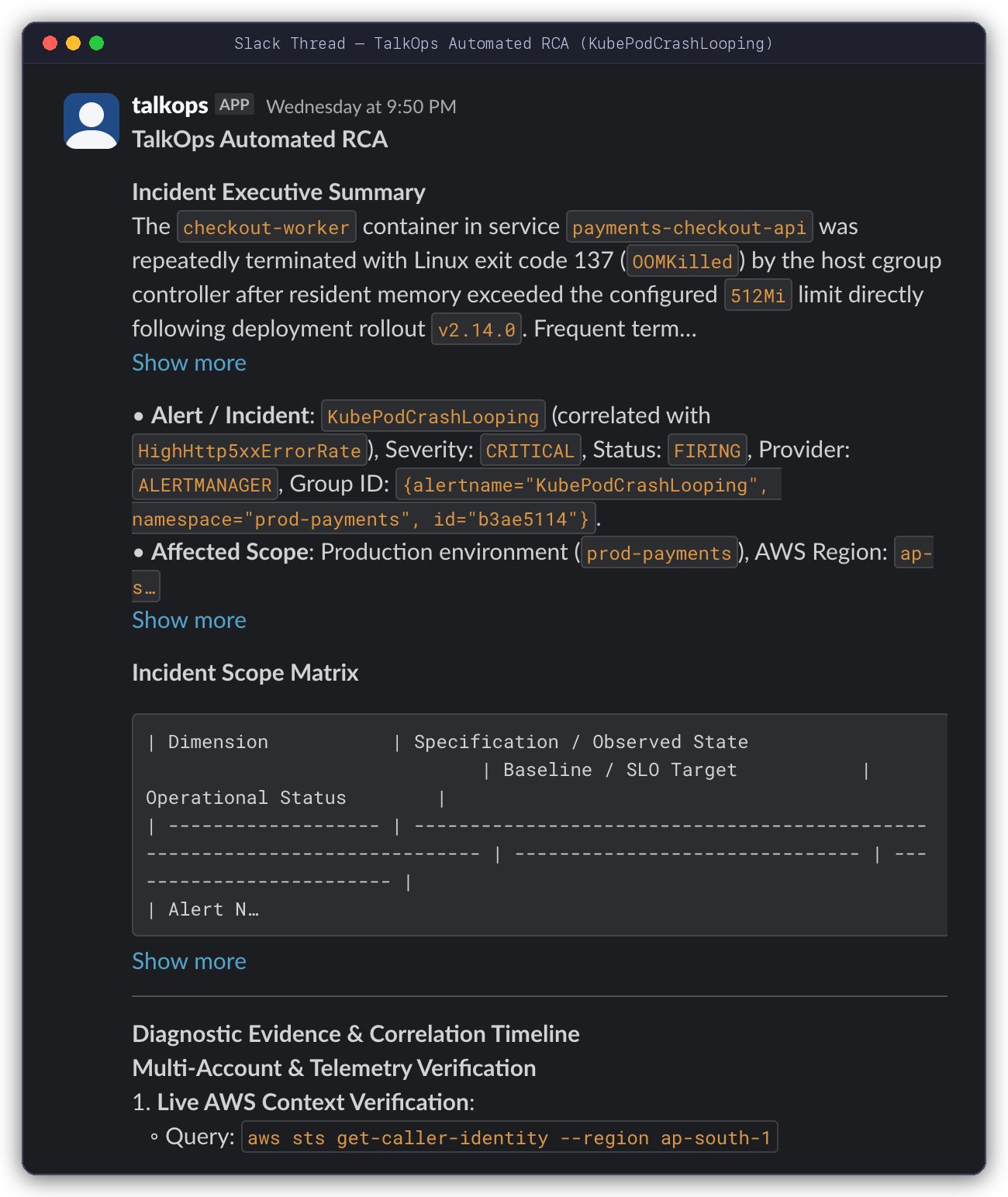
Stage 2 — Full Root Cause Analysis Inside the Thread: Clicking into the thread shows the full executive summary, incident scope table, and step-by-step diagnostic evidence gathered from your cloud and Kubernetes environment.
Starting the Webhook Server
Your platform or SRE team can start the webhook server with a single command (talkops serve or talkops webhooks):
# 1. Start the server on port 2024 in Smart Mode
export TALKOPS_WEBHOOK_SECRET="your-shared-webhook-secret"
talkops serve --host 0.0.0.0 --port 2024 --approval-mode smart

# 2. Or run in strict Read-Only Mode (guarantees the AI can only inspect, never modify, cloud resources)
talkops webhooks --port 2024 --smart --read-only

# 3. View all supported webhook URLs and their security status
talkops serve list
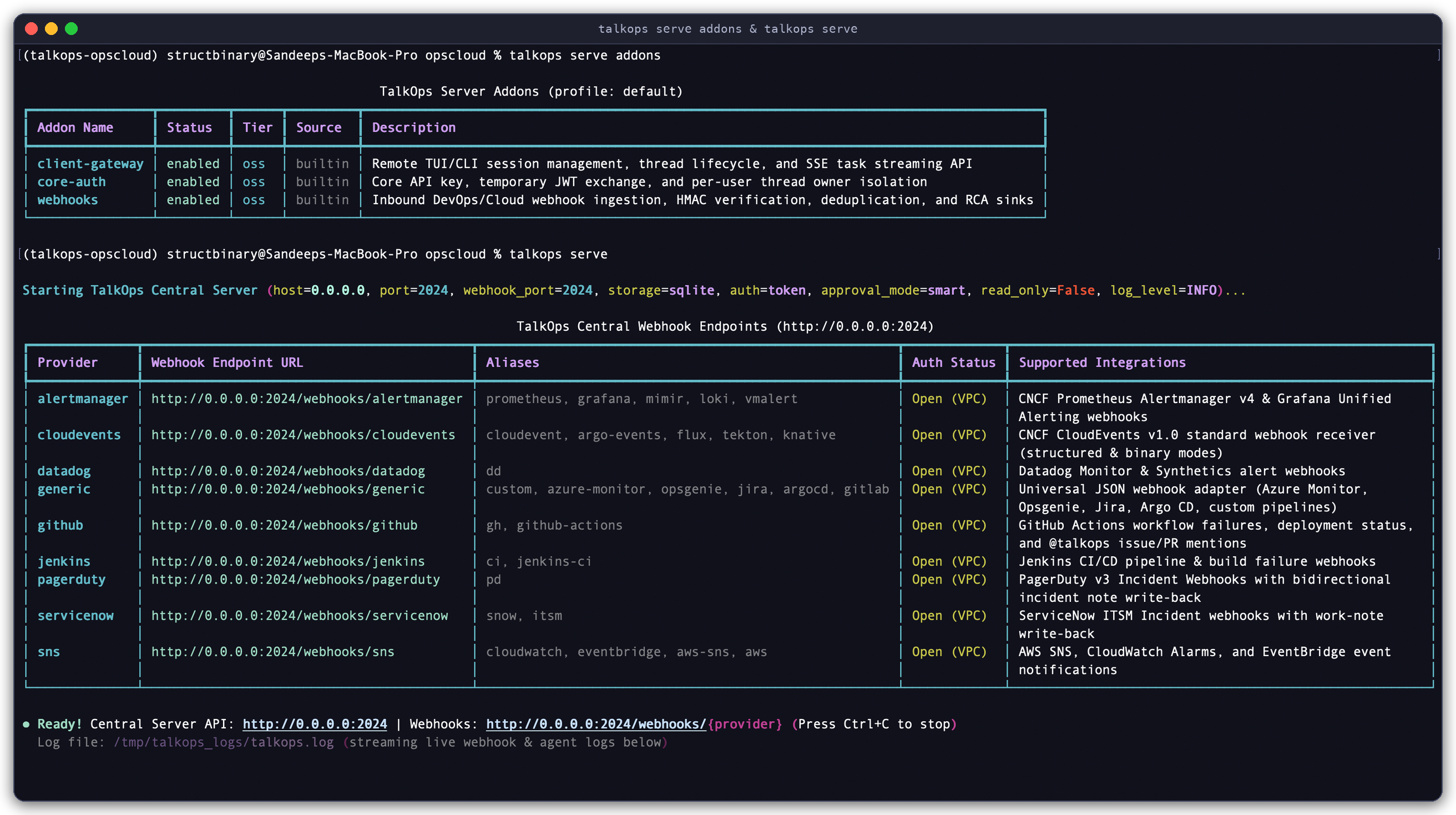
Launching the Webhook Server (talkops serve): Starting the server on port 2024 in Smart Mode and displaying the ready-to-use webhook URLs for all 9 built-in integrations.
Keeping internal team traffic separate from external alerts: If you want your engineers to connect on a private internal port (2024) while opening a separate port (8080) on your firewall solely for incoming webhooks, add --webhook-port 8080:
talkops serve --host 0.0.0.0 --port 2024 --webhook-port 8080 --smart
Supported Alert & CI/CD Integrations
TalkOps includes 9 built-in webhook adapters (plus 22 shorthand URL aliases) so you can point almost any monitoring, ticketing, or CI/CD tool straight at your server:
| Integration | Webhook URL Path | Shorthand Aliases | What Triggers an Investigation | Where TalkOps Replies Automatically |
|---|---|---|---|---|
| PagerDuty | /webhooks/pagerduty | /webhooks/pd | Triggered, escalated, or reopened incidents + human notes added to an incident | PagerDuty Incident Notes + Slack / Discord / Teams |
| Prometheus & Grafana | /webhooks/alertmanager | /webhooks/prometheus, /webhooks/grafana, /webhooks/mimir, /webhooks/loki, /webhooks/vmalert | Firing alert groups | Slack / Discord / Teams + Custom Callback URL |
| AWS SNS, CloudWatch & EventBridge | /webhooks/sns | /webhooks/cloudwatch, /webhooks/eventbridge, /webhooks/aws-sns, /webhooks/aws | CloudWatch ALARM states, EventBridge failure events, and SNS notifications (auto-confirms AWS topic subscriptions) | Slack / Discord / Teams + Custom Callback URL |
| Datadog | /webhooks/datadog | /webhooks/dd | Triggered Datadog Monitor and Synthetics alerts | Slack / Discord / Teams + Custom Callback URL |
| ServiceNow ITSM | /webhooks/servicenow | /webhooks/snow, /webhooks/itsm | New or active ServiceNow incidents | ServiceNow Incident work_notes + Slack / Discord / Teams |
| GitHub | /webhooks/github | /webhooks/gh, /webhooks/github-actions | Failed GitHub Actions runs, failed deployments, new issues, or any PR/issue comment mentioning @talkops | GitHub Issue / PR Comments + Slack / Discord / Teams |
| Jenkins | /webhooks/jenkins | /webhooks/ci, /webhooks/jenkins-ci | Failed, unstable, or aborted pipeline builds | Slack / Discord / Teams + Custom Callback URL |
| CloudEvents (Kubernetes / GitOps) | /webhooks/cloudevents | /webhooks/argo-events, /webhooks/flux, /webhooks/tekton, /webhooks/knative | Flux CD, Argo Events, Tekton, and Knative failure events | Slack / Discord / Teams + Custom Callback URL |
| Azure Monitor, Opsgenie, Jira, Argo CD & GitLab | /webhooks/generic | /webhooks/azure-monitor, /webhooks/opsgenie, /webhooks/jira, /webhooks/argocd, /webhooks/gitlab, /webhooks/custom | Fired Azure Monitor alerts, Opsgenie alerts, Jira incidents, Argo CD sync failures, GitLab hooks, or custom JSON | Slack / Discord / Teams + Custom Callback URL |
Setup Guide by Tool
1. PagerDuty (/webhooks/pagerduty or /webhooks/pd)
Connects to PagerDuty v3 Webhooks (and legacy v2 webhooks).
- How it works: Starts an investigation when an incident is triggered, escalated, or reopened. If a responder types a note on the PagerDuty incident (for example, "Check the recent payment-service deployment"), PagerDuty sends that note to TalkOps and TalkOps continues the investigation in the same thread—while automatically ignoring its own
[TalkOps Automated RCA]notes so it never loops. - Automatic PagerDuty Note write-back: Set
TALKOPS_WEBHOOK_PAGERDUTY_API_KEYandTALKOPS_WEBHOOK_PAGERDUTY_FROM_EMAILto have TalkOps post the finished RCA directly onto the PagerDuty incident timeline.
Example PagerDuty test command (curl)
curl -X POST http://localhost:2024/webhooks/pagerduty \
  -H "Content-Type: application/json" \
  -H "X-PagerDuty-Signature: v1=..." \
  -d '{
    "event": {
      "id": "01H8X9Z2A3B4C5D6E7",
      "event_type": "incident.triggered",
      "data": {
        "id": "Q1A2B3C4D5E6F7",
        "number": 4821,
        "title": "High 5xx Error Rate on checkout-service (prod-us-east-1)",
        "urgency": "high",
        "status": "triggered",
        "service": {"summary": "checkout-service"},
        "priority": {"summary": "P1"}
      }
    }
  }'
2. Prometheus Alertmanager & Grafana (/webhooks/alertmanager or /webhooks/grafana)
Connects to Prometheus Alertmanager, Grafana Unified Alerting, VictoriaMetrics, Mimir, and Loki.
- How it works: Groups related firing alerts (such as multiple crashing pods in the same Kubernetes namespace) into a single investigation thread and ignores
"resolved"notifications automatically.
Example Alertmanager test command (curl)
curl -X POST http://localhost:2024/webhooks/alertmanager \
  -H "Content-Type: application/json" \
  -H "Authorization: Bearer $TALKOPS_WEBHOOK_SECRET" \
  -d '{
    "status": "firing",
    "groupKey": "{}:{alertname=\"KubePodCrashLooping\", namespace=\"prod-payments\"}",
    "commonLabels": {
      "alertname": "KubePodCrashLooping",
      "severity": "critical",
      "namespace": "prod-payments",
      "service": "payments-checkout-api"
    },
    "commonAnnotations": {
      "summary": "Pod payments-checkout-api-6d8f9b7c4-x9k2m in prod-payments is CrashLoopBackOff (exit code 137 / OOMKilled)"
    },
    "alerts": [
      {
        "status": "firing",
        "labels": {"pod": "payments-checkout-api-6d8f9b7c4-x9k2m", "severity": "critical"},
        "annotations": {"description": "Container checkout-worker exceeded memory limit (512Mi)"}
      }
    ]
  }'
3. AWS SNS, CloudWatch Alarms & EventBridge (/webhooks/sns or /webhooks/cloudwatch)
Connects to Amazon SNS topics, CloudWatch Alarms, and Amazon EventBridge rules.
- Zero-touch AWS setup: When you add
https://your-server/webhooks/snsas an HTTPS subscriber in AWS SNS, TalkOps automatically verifies that the confirmation link belongs to AWS (amazonaws.com) and confirms the subscription for you. - How it works: Unwraps CloudWatch Alarm details (metric name, dimensions, account, region, and threshold reason) and EventBridge events, and automatically ignores
"OK"recovery states.
Example AWS CloudWatch / SNS test command (curl)
curl -X POST http://localhost:2024/webhooks/cloudwatch \
  -H "Content-Type: application/json" \
  -d '{
    "Type": "Notification",
    "MessageId": "a1b2c3d4-5678-90ab-cdef-111122223333",
    "TopicArn": "arn:aws:sns:us-east-1:123456789012:prod-cloudwatch-alarms",
    "Message": "{\"AlarmName\":\"prod-rds-high-cpu\",\"NewStateValue\":\"ALARM\",\"NewStateReason\":\"CPUUtilization exceeded 85%\",\"Region\":\"us-east-1\",\"AWSAccountId\":\"123456789012\",\"Trigger\":{\"Namespace\":\"AWS/RDS\",\"MetricName\":\"CPUUtilization\"}}"
  }'
4. Datadog (/webhooks/datadog or /webhooks/dd)
Connects to Datadog Monitors and Synthetics tests.
- How it works: Reads the monitor title, priority (
P1–P5), metric query, affected host/service scope, and Datadog alert link. Automatically ignores"Recovered"transitions.
5. ServiceNow ITSM (/webhooks/servicenow or /webhooks/snow)
Connects to ServiceNow Incident webhooks.
- How it works: Reads the incident number (
INC...), priority, affected service (cmdb_ci),assignment group, and description. - Automatic
work_noteswrite-back: SetSERVICENOW_URLandSERVICENOW_TOKENso TalkOps automatically writes the completed[TalkOps Automated RCA]back into the ServiceNow ticket'swork_notes.
6. GitHub Actions, Deployments & @talkops Mentions (/webhooks/github)
Connects to GitHub repository and organization webhooks.
- What it handles:
- Failed CI/CD workflows & deployments: Automatically investigates failed GitHub Actions runs (
workflow_run,check_run,check_suite) and faileddeployment_statusevents. @talkopson Pull Requests & Issues: Developers can comment@talkops why did the staging Terraform plan fail?on any PR or Issue to trigger an investigation.
- Failed CI/CD workflows & deployments: Automatically investigates failed GitHub Actions runs (
- Automatic PR/Issue comment write-back: Set
TALKOPS_WEBHOOK_GITHUB_TOKEN(orGITHUB_TOKEN) and TalkOps replies directly on the GitHub Pull Request or Issue with### [TalkOps Automated Analysis].
7. Jenkins CI/CD (/webhooks/jenkins or /webhooks/ci)
Connects to the Jenkins Notification Plugin or Pipeline httpRequest steps.
- How it works: Investigates failed, unstable, or aborted builds using the job name, build number, Git branch/commit, and failure log excerpt, while ignoring queued or passing builds.
8. Kubernetes & GitOps CloudEvents (/webhooks/cloudevents, /webhooks/flux, /webhooks/argo-events)
Connects to any tool that sends CNCF CloudEvents 1.0—including Flux CD, Argo Events, Tekton, and Knative.
9. Azure Monitor, Opsgenie, Jira, Argo CD, GitLab & Custom Webhooks (/webhooks/generic)
- Azure Monitor (
/webhooks/azure-monitor): Built-in support for the Azure Monitor Common Alert Schema. - Opsgenie, Jira, Argo CD, GitLab & Custom JSON: Point any internal script or tool to
/webhooks/custom(or/webhooks/opsgenie,/webhooks/jira,/webhooks/argocd,/webhooks/gitlab) with a simple JSON body containingtitle,summary, andseverity.
Setting Up Chat & Ticket Notifications
1. Sending threaded updates to Slack, Discord, or Microsoft Teams
To get the two-stage threaded chat experience shown above (Investigating... card $\rightarrow$ threaded RCA reply + updated RCA Complete card), set TALKOPS_WEBHOOK_NOTIFY_CHANNELS along with your chat bot token:
# Send webhook alerts and RCA reports to a Slack channel, Discord channel, or Microsoft Teams thread
export TALKOPS_WEBHOOK_NOTIFY_CHANNELS="slack:C0123456789,discord:112233445566778899,teams:19:ops_alerts@thread.tacv2"

# Add the token for the chat platform(s) you use:
export SLACK_BOT_TOKEN="xoxb-..."
export DISCORD_BOT_TOKEN="..."
export TEAMS_APP_ID="..."
export TEAMS_APP_PASSWORD="..."
Want a simple Slack Incoming Webhook URL instead of a Bot Token?
If you don't want to set up a Slack Bot Token, you can simply set TALKOPS_WEBHOOK_SLACK_URL="https://hooks.slack.com/services/..." (or slack_url in config.toml) and TalkOps will post a single Block Kit RCA card when each investigation finishes.
Advanced: Route critical alerts to one channel and CI failures to another (.talkops/addons.json)
You can route different alert sources or severities to separate chat channels in .talkops/addons.json:
{
  "addons": {
    "webhooks": {
      "enabled": true,
      "max_concurrent_runs": 10,
      "dedup_ttl_seconds": 300,
      "outbound_channels": [
        {
          "channel": "slack",
          "conversation_id": "C0123456789",
          "providers": ["pagerduty", "alertmanager", "sns", "datadog"],
          "severities": ["critical", "high"],
          "notify_on": ["received", "completed"]
        },
        {
          "channel": "discord",
          "conversation_id": "112233445566778899",
          "providers": ["github", "jenkins"],
          "severities": ["*"],
          "notify_on": ["completed"]
        }
      ]
    }
  }
}
2. Sending RCA reports back to tickets, PRs, or custom webhooks
| Destination | What to Configure | What Happens When the Investigation Finishes |
|---|---|---|
| PagerDuty Incident Notes | TALKOPS_WEBHOOK_PAGERDUTY_API_KEY + TALKOPS_WEBHOOK_PAGERDUTY_FROM_EMAIL | Adds [TalkOps Automated RCA] as a note on the PagerDuty incident. |
| ServiceNow Work Notes | SERVICENOW_URL + SERVICENOW_TOKEN | Adds [TalkOps Automated RCA] to the ServiceNow incident's work_notes. |
| GitHub Pull Requests & Issues | TALKOPS_WEBHOOK_GITHUB_TOKEN (or GITHUB_TOKEN) | Posts ### [TalkOps Automated Analysis] as a comment on the Issue or PR. |
| Custom HTTP Callback | TALKOPS_WEBHOOK_CALLBACK_URL (or "callback_url" in the webhook payload) | Sends a JSON POST with the incident_id, thread_id, status, and analysis to your internal portal or event bus. |
How Engineers Can Jump Into an Alert Thread
Every Slack card, ticket note, and webhook response includes a Thread ID (for example, ee321cdc-aea6-594b-96cd-d3710ed3bc81).
If an on-call engineer reads the automated RCA in Slack and wants to ask follow-up questions or apply the fix, they don't have to start over. They can open that exact investigation in their terminal with one command:
# Open the webhook's investigation thread in the interactive terminal UI
talkops --server-url http://talkops.internal:2024 -r ee321cdc
Inside the terminal, the engineer sees every log query and command TalkOps already ran, and can either continue chatting or type /fork to branch the investigation into their own private workspace.
You can also check recent webhook deliveries at any time over HTTP:
curl -s http://localhost:2024/webhooks/deliveries | jq .
Configuration Reference (config.toml & Environment Variables)
You can store your webhook settings in ~/.talkops/config.toml (or .talkops/config.toml) instead of passing environment variables on every run:
[webhooks]
host = "0.0.0.0"
port = 2024
dedupe_ttl_seconds = 300       # Ignore duplicate alert bursts within 5 minutes
max_concurrent_runs = 5        # Max simultaneous background investigations
sns_auto_confirm = true        # Automatically confirm AWS SNS subscriptions

# Inbound security secrets (verifies webhook senders)
secret = "env:TALKOPS_WEBHOOK_SECRET"
pagerduty_secret = "env:TALKOPS_WEBHOOK_PAGERDUTY_SECRET"
github_secret = "env:TALKOPS_WEBHOOK_GITHUB_SECRET"
gitlab_token = "env:TALKOPS_WEBHOOK_GITLAB_TOKEN"
jenkins_token = "env:TALKOPS_WEBHOOK_JENKINS_TOKEN"

# Outbound write-back credentials
slack_url = "env:TALKOPS_WEBHOOK_SLACK_URL"
pagerduty_api_key = "env:TALKOPS_WEBHOOK_PAGERDUTY_API_KEY"
pagerduty_from_email = "talkops-bot@company.com"
github_token = "env:TALKOPS_WEBHOOK_GITHUB_TOKEN"
callback_url = "https://internal-portal.company.com/api/talkops-rca"
Complete list of webhook settings and environment variables
Setting (config.toml) | Environment Variable | Default | Purpose |
|---|---|---|---|
webhooks.host | TALKOPS_WEBHOOK_HOST | "0.0.0.0" | Network address the server listens on. |
webhooks.port | TALKOPS_WEBHOOK_PORT | 2024 | Port the server listens on. |
webhooks.secret | TALKOPS_WEBHOOK_SECRET | None | Default shared secret (Authorization: Bearer <secret>, X-Webhook-Token, or ?token=). |
webhooks.pagerduty_secret | TALKOPS_WEBHOOK_PAGERDUTY_SECRET | None | PagerDuty webhook signing secret (X-PagerDuty-Signature). |
webhooks.github_secret | TALKOPS_WEBHOOK_GITHUB_SECRET | None | GitHub webhook signing secret (X-Hub-Signature-256). |
webhooks.gitlab_token | TALKOPS_WEBHOOK_GITLAB_TOKEN | None | GitLab webhook token (X-Gitlab-Token). |
webhooks.jenkins_token | TALKOPS_WEBHOOK_JENKINS_TOKEN | None | Jenkins webhook token (X-Jenkins-Token or Bearer). |
| — | TALKOPS_WEBHOOK_SECRET_<PROVIDER> | None | Custom secret for any specific provider (e.g., TALKOPS_WEBHOOK_SECRET_DATADOG). |
webhooks.dedupe_ttl_seconds | TALKOPS_WEBHOOK_DEDUPE_TTL_SECONDS | 300 | Window (in seconds) to ignore duplicate alerts during an alert storm. |
webhooks.max_concurrent_runs | TALKOPS_WEBHOOK_MAX_CONCURRENT_RUNS | 5 | Maximum number of webhook investigations allowed to run at the same time. |
webhooks.sns_auto_confirm | TALKOPS_WEBHOOK_SNS_AUTO_CONFIRM | true | Automatically confirm new AWS SNS topic subscriptions. |
| — | TALKOPS_WEBHOOK_IGNORE_RESOLVED | true | Skip "Resolved" / "OK" alerts and passing CI builds. |
| — | TALKOPS_WEBHOOK_INSTRUCTIONS | Built-in SRE prompt | Custom instructions added to every webhook investigation prompt. |
| — | TALKOPS_WEBHOOK_NOTIFY_CHANNELS | None | Threaded chat targets (slack:<channel>,discord:<channel>,teams:<conv>). |
webhooks.slack_url | TALKOPS_WEBHOOK_SLACK_URL | None | One-step Slack Incoming Webhook URL. |
webhooks.pagerduty_api_key | TALKOPS_WEBHOOK_PAGERDUTY_API_KEY | None | PagerDuty API key for posting incident notes. |
webhooks.pagerduty_from_email | TALKOPS_WEBHOOK_PAGERDUTY_FROM_EMAIL | None | PagerDuty user email required when posting incident notes. |
| — | SERVICENOW_URL & SERVICENOW_TOKEN | None | ServiceNow instance URL and token for updating incident work_notes. |
webhooks.github_token | TALKOPS_WEBHOOK_GITHUB_TOKEN | None | GitHub token for commenting on Issues and Pull Requests. |
webhooks.callback_url | TALKOPS_WEBHOOK_CALLBACK_URL | None | Custom URL to receive completed JSON RCA reports. |
Next Steps
- Central Server & Team Collaboration — Learn how multiple engineers share
talkops servewith PostgreSQL and single sign-on - Approval Modes & Smart Mode — See how Smart Mode keeps automated investigations fast, affordable, and safe in production
- Hooks — Run custom local scripts whenever
webhook.receivedorwebhook.completedfires