Custom Commands
Define reusable
/commandworkflows as Markdown files with YAML frontmatter, live shell context, and scoped tool permissions
Custom commands let you turn repeatable engineering workflows—such as pre-deploy checks, incident triage templates, git summaries, or Terraform reviews—into slash commands by dropping a .md file into .talkops/commands/ or ~/.talkops/commands/.
You don't need to write any Python code. Each command is a Markdown prompt template with optional YAML frontmatter that supports:
- Positional and named arguments (
$ARGUMENTS,$0,$1, or custom$env/$namespaceparameters) - Inline shell execution (
!`git status`and```!) to inject live cluster or repository state before the model runs - Scoped tool permissions (
allowed-toolswith brace expansion anddisallowed-tools) - Model, effort, and subagent overrides (
model,effort, andcontext: fork) - Automatic hot-reloading whenever you edit or add command files on disk
Quick Start: Create Your First Command
1. Create a Markdown file in .talkops/commands/
Create .talkops/commands/git/summary.md in your repository:
---
description: "Summarize recent commits in the repository"
argument-hint: "[commit-range]"
allowed-tools:
  - "Bash(git:{log,diff,status} *)"
  - read_file
effort: medium
---

## Working Tree Status
!`git status --short`

## Recent Commits
!`git log -n 10 --oneline`

Summarize the recent changes above, grouping them into:
1. Features and infrastructure updates
2. Bug fixes and reliability improvements
3. Any potential operational or migration risks

Additional focus or commit range: $ARGUMENTS
2. Invoke it from the / prompt
Because TalkOps watches your commands/ directories for file changes, new and edited commands are picked up automatically (or you can run /reload at any time).
Type / in the prompt bar to see your custom command in the autocomplete menu with its (project) scope badge, and press Enter to run it:
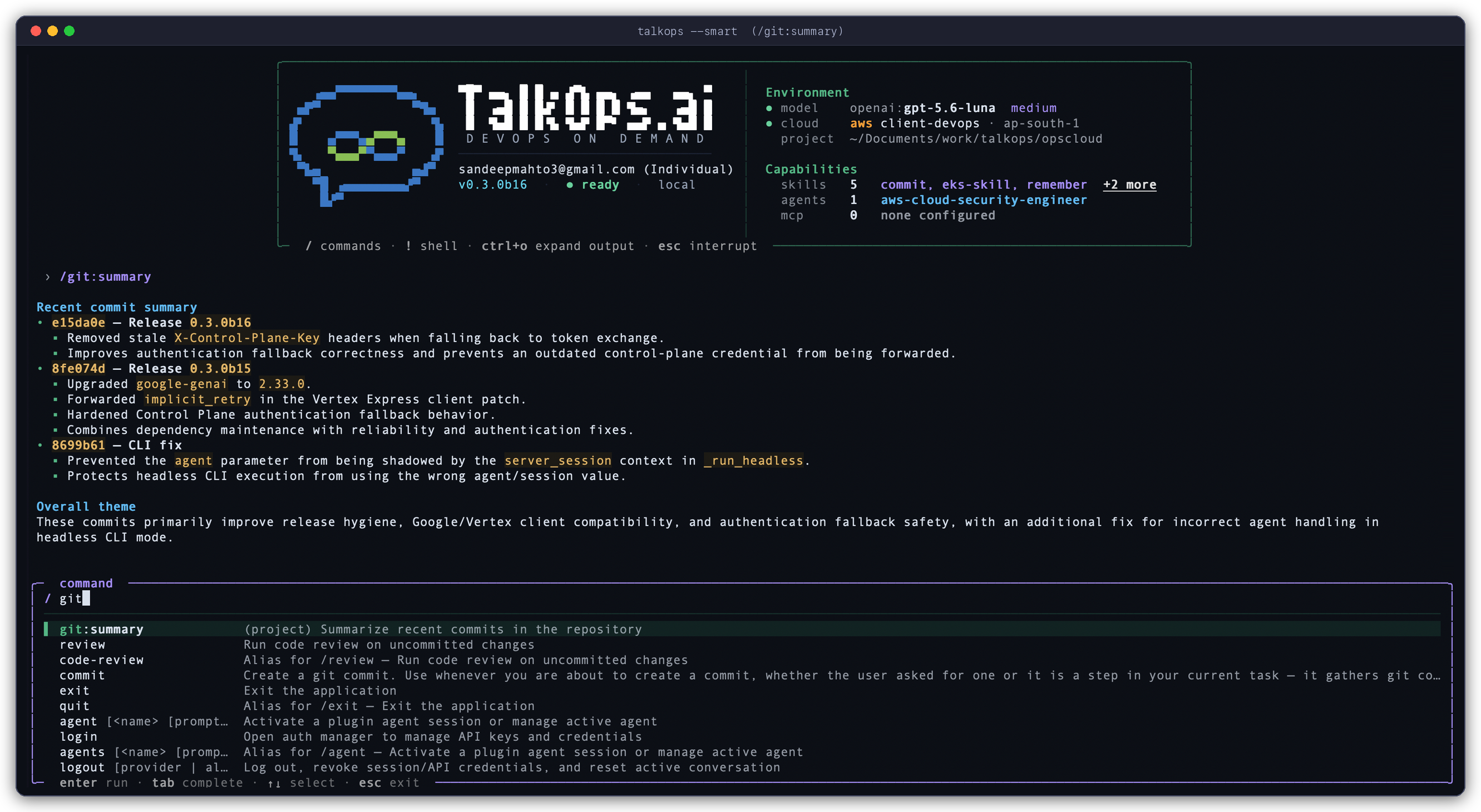
Run the command with or without arguments:
/git:summary
/git:summary Focus on database and IAM changes
Discovery Scopes, Precedence, and Namespaces
TalkOps discovers .md command files across four scopes. If two scopes define a command with the same name, the higher-priority scope wins:
| Priority | Scope | Directory Location | UI Badge | When to Use |
|---|---|---|---|---|
| 1 (Highest) | Managed Policy | $TALKOPS_MANAGED_COMMANDS_DIR (or $CLAUDE_MANAGED_COMMANDS_DIR) | (policy) | Organization-wide standard commands enforced across all workstations |
| 2 | Project | .talkops/commands/ and .claude/commands/ (walked from current directory up to the Git root) | (project) or (project:<folder>) | Team workflows committed to version control for a specific repository |
| 3 | User | ~/.talkops/commands/ and ~/.claude/commands/ | (user) | Personal shortcuts available across all your projects |
| 4 (Lowest) | Plugin | <plugin_root>/commands/ | (plugin:<name>) | Commands bundled inside an installed plugin |
Subdirectory Namespacing (: and Space Aliases)
You can organize commands into nested folders inside commands/. Directory names become colon-separated namespaces, and TalkOps also accepts space-separated invocation automatically:
| File Path | Canonical Slash Command | Space-Separated Alias |
|---|---|---|
.talkops/commands/review.md | /review | — |
.talkops/commands/git/summary.md | /git:summary | /git summary <args> |
.talkops/commands/aws/audit.md | /aws:audit | /aws audit <args> |
.talkops/commands/k8s/rollout/status.md | /k8s:rollout:status | /k8s rollout status <args> |
.talkops/commands/terraform/SKILL.md | /terraform | — |
Smart Autocomplete Ranking: As you run custom commands, TalkOps tracks usage frequency with a 7-day recency half-life (~/.talkops/.state/command_usage.json) so your most frequently used commands float to the top of the / autocomplete list.
Frontmatter Reference
All YAML frontmatter fields are optional. If a file has no frontmatter at all, TalkOps derives the command name from the file path and uses the first non-heading paragraph of the Markdown body as the description.
---
name: k8s:preflight
description: "Verify Kubernetes cluster health and pending rollouts before deployment"
when_to_use: "Use before rolling out a release or applying Helm/Kustomize changes"
argument-hint: "<namespace> [deployment]"
arguments:
  - namespace
  - deployment
allowed-tools:
  - "Bash(kubectl:{get,describe,logs,rollout} *)"
  - read_file
disallowed-tools:
  - write_file
  - edit_file
model: sonnet
effort: high
context: inline
agent: general-purpose
disable-model-invocation: false
user-invocable: true
paths:
  - "k8s/**/*.yaml"
  - "charts/**"
shell: bash
version: "1.0.0"
---
| Field | Type | Default | Description |
|---|---|---|---|
name | string | Derived from file path | Explicit command name override. |
description | string | First body paragraph | Short summary displayed in / autocomplete and the model's skill catalog. |
when_to_use | string | null | Guidance telling the agent when to invoke this command autonomously via the Skill tool. |
argument-hint | string | null | Placeholder hint shown next to the command name in / autocomplete (for example, <env> [service]). |
arguments | list[str] | [] | Named positional parameters (for example, [namespace, deployment]), enabling $namespace and $deployment placeholders in the body. |
allowed-tools | list[str] | [] | Tool patterns pre-approved for this command without prompting; supports brace expansion (such as Bash(git:{diff,status} *)). Also accepts allowed_tools. |
disallowed-tools | list[str] | [] | Tool patterns blocked for the duration of this command turn. Also accepts disallowed_tools. |
model | string | inherit | Model override for the command turn: haiku, sonnet, opus, inherit, or a full provider:model identifier. |
effort | string | int | null | Reasoning effort for the command turn: low, medium, high, max, or an integer token budget. |
context | string | "inline" | Execution mode: "inline" (runs in the main conversation) or "fork" (delegates to an isolated subagent). |
agent | string | "general-purpose" | Target subagent type when context: fork is set (for example, aws-sre-agent or general-purpose). |
disable-model-invocation | bool | false | When true, only the user can run /command manually; the model will not invoke it automatically. |
user-invocable | bool | true | When false, hides the command from the / autocomplete menu so it acts purely as a background model skill. |
paths | list[str] | [] | Glob patterns (such as "**/*.tf"). Keeps the command dormant in the model catalog until a matching file path is referenced. |
shell | string | "bash" | Shell interpreter used for inline ! commands ("bash" or "powershell"). |
version | string | null | Optional semantic version string for documentation and tracking. |
Dynamic Prompt Expansion
When you run a custom command, TalkOps runs a four-stage expansion pipeline before sending the prompt to the model:
1. Positional and Named Arguments
Arguments passed after /command are parsed using shell-style quoting (so "my multi-word arg" is treated as a single positional argument):
| Placeholder | Behavior |
|---|---|
$ARGUMENTS | Replaced with the entire raw argument string passed after /command. |
$0, $1, $2 | Replaced with the Nth positional argument (0-indexed). Out-of-range indices expand cleanly to an empty string. |
$ARGUMENTS[0], $ARGUMENTS[1] | Alternative bracketed syntax for positional arguments. |
$<name> | Replaced with the corresponding positional argument declared in arguments: [name1, name2] in the frontmatter. |
\$ARGUMENTS, \$0, \$name | Escaped dollar sign—renders literally without substitution. |
Automatic Fallback When No Placeholder Is Present: If your Markdown template doesn't include $ARGUMENTS, $0, or any named $param placeholder and you pass arguments when running /command <args>, TalkOps automatically appends ARGUMENTS: <args> to the end of the expanded prompt so your input is never lost.
2. Built-in Environment Variables and @file Mentions
You can reference workspace and session paths inside any custom command body:
${TALKOPS_SKILL_DIR}/${CLAUDE_SKILL_DIR}— Absolute path to the directory containing the command's.mdfile (useful for referencing helper scripts next to the command).${TALKOPS_PROJECT_DIR}/${CLAUDE_PROJECT_DIR}— Absolute path to the current project root.${TALKOPS_SESSION_ID}/${CLAUDE_SESSION_ID}— Active conversation thread ID.${TALKOPS_EFFORT}— Active reasoning effort level.${TALKOPS_PLUGIN_ROOT}/${CLAUDE_PLUGIN_ROOT}— Root directory of the owning plugin (for plugin-bundled commands).${TALKOPS_PLUGIN_DATA}/${CLAUDE_PLUGIN_DATA}— Persistent data directory of the owning plugin.@path/to/file— Automatically extracted and attached as referenced file context (and unlocks anypaths:-scoped commands matching that file).
3. Inline Shell Execution (!`cmd` and ```!)
Embed live diagnostic output directly into the prompt before the model begins reasoning:
- Inline backtick syntax (
!`command`) replaces the expression in-place with stdout. - Fenced code block syntax (
```!) executes multi-line shell commands and replaces the block with the combined output.
Current Git branch: !`git branch --show-current`
Active Kubernetes context: !`kubectl config current-context`

### Recent Pod Events
```!
kubectl get events --sort-by='.lastTimestamp' | tail -n 15
```
Argument Sanitization & Timeouts:
- Each inline shell block runs in your project root with a 30-second timeout. If a command fails or times out, TalkOps inserts an
[Error: ...]marker into the expanded prompt rather than crashing your session. - User-supplied command arguments are substituted before shell blocks run, and TalkOps automatically neutralizes
!shell-execution triggers inside user arguments so untrusted argument text cannot inject additional!`...`blocks.
Controlling Execution, Permissions, and Chaining
Tool Allowlists and Brace Expansion (allowed-tools & disallowed-tools)
Custom commands can pre-authorize specific read-only or diagnostic commands so TalkOps doesn't have to pause for manual approval on every step:
allowed-tools:
  - "Bash(kubectl:{get,describe,logs} *)"
  - "Bash(aws:{sts,cloudwatch,ecs} *)"
  - read_file
disallowed-tools:
  - write_file
  - edit_file
- Brace expansion:
"Bash(kubectl:{get,describe,logs} *)"expands automatically intoBash(kubectl get *),Bash(kubectl describe *), andBash(kubectl logs *). - Permission lifetime:
allowed-toolsgrants are registered in the active session's command permissions so multi-step follow-ups in the workflow don't repeatedly re-prompt.disallowed-tools,model, andeffortoverrides are turn-scoped—they apply strictly to the command execution turn and reset automatically on your next normal message.
Isolated Subagent Execution (context: fork)
For heavy audits or verbose multi-file investigations that would otherwise fill up your main conversation context, set context: fork in the frontmatter:
---
description: "Run a deep security & IAM audit in an isolated subagent"
context: fork
agent: aws-cloud-security-engineer
model: sonnet
effort: high
---

Audit all Terraform IAM policies in `$0` for wildcard actions or missing resource constraints, and return a prioritized remediation table.
When invoked, TalkOps dispatches the expanded prompt to the specified agent (defaulting to general-purpose) via an isolated task subagent call and returns the concise summary to your main chat.
Chaining Multiple Custom Commands
You can stack up to 5 custom commands in a single prompt line:
/k8s:preflight /security-checklist production
When you chain commands:
- Shared trailing arguments (
production) are passed to each command in the chain. - Each command's template is expanded in order and combined with a
---separator. allowed-toolsanddisallowed-toolsare merged across the chain (and if any command in the chain requestscontext: fork, the combined workflow runs in a forked subagent).
Practical Examples
1. Minimal Zero-Frontmatter Command (.talkops/commands/explain.md)
Explain the architecture, key classes, and request flow of the specified module in clear, concise terms.

Target module or file: $ARGUMENTS
Invoke with:
/explain src/talkops/plugins/discovery.py
2. Parameterized Kubernetes Namespace Drift Check (.talkops/commands/k8s/drift.md)
---
description: "Compare workloads and ConfigMaps between two Kubernetes namespaces"
argument-hint: "<source-namespace /> <target-namespace>"
arguments:
  - source_ns
  - target_ns
allowed-tools:
  - "Bash(kubectl:{get,diff,describe} *)"
---

## Workloads in `$source_ns`
!`kubectl get deploy,sts,daemonset -n $source_ns -o wide`

## Workloads in `$target_ns`
!`kubectl get deploy,sts,daemonset -n $target_ns -o wide`

Compare the deployments, image tags, replica counts, and ConfigMaps between `$source_ns` and `$target_ns` and highlight any configuration drift.
Invoke with either colon or space syntax:
/k8s:drift staging production
/k8s drift staging production
3. Path-Scoped Terraform Review (.talkops/commands/tf/validate.md)
---
description: "Validate Terraform formatting, providers, and module changes"
paths:
  - "**/*.tf"
  - "**/*.tfvars"
allowed-tools:
  - "Bash(terraform:{fmt,validate,version} *)"
  - read_file
---

!`terraform version`

Review the referenced Terraform files for state hazards, unpinned provider versions, and security group exposure.
Because paths: is set, this command stays dormant in the model's autonomous skill catalog until you reference a .tf or .tfvars file (or invoke /tf:validate directly).
Related Documentation
- Memory and Skills — Persistent
TALKOPS.mdinstructions and multi-fileSKILL.mddomain packages. - Subagents — Defining custom subagents and using
context: forkdelegation. - Plugins and Marketplaces — Packaging custom commands, skills, and subagents for your team.
- Approval Modes and Safety — How tool permissions, HITL modes, and allowlists work.
- CLI & TUI Reference — Built-in slash commands and keyboard shortcuts.