Memory and Skills
TalkOps gives you two complementary ways to customize how the agent works in your environment and retain operational knowledge across sessions:
- Memory — Persistent
AGENTS.mdfiles and key-value memory entries that load automatically at the start of every session. Use memory for your team's infrastructure conventions, naming standards, preferred regions, and lessons learned. - Skills — Reusable, on-demand playbooks (
SKILL.mddirectories) that package step-by-step operational procedures, troubleshooting runbooks, reference docs, and helper scripts.
At any point during a conversation, you can run /remember to have TalkOps distill what you just solved into either persistent memory or a reusable skill.
Memory
Memory ensures you never have to repeat your environment rules—such as which AWS profiles to use, how Terraform workspaces are structured, or which tags are required on every resource.
Capturing Learnings with /remember
As you work with TalkOps—especially after troubleshooting a tricky incident or correcting how a command should be run—use /remember to save the takeaway for future sessions:
# Let TalkOps review the current conversation and extract key conventions automatically
/remember

# Or tell TalkOps specifically what to remember
/remember Our S3 buckets always require KMS customer-managed keys and bucket-owner-enforced ownership
When you run /remember, TalkOps analyzes the conversation and decides the best place to store each takeaway:
- Simple preferences, rules, and environment facts are added to
AGENTS.md. - Repeatable, multi-step operational procedures are packaged into a new Skill (
SKILL.md).
Two Layers of Memory
TalkOps combines two types of persistent memory at session startup:
1. AGENTS.md Files (Always-On Instructions)
AGENTS.md files are plain Markdown documents loaded directly into the agent's instructions at the start of every session:
| Scope | File Locations | Best Used For |
|---|---|---|
| Project (shared with team) | .talkops/AGENTS.md or AGENTS.md (in repo root) | Repository architecture, environment names (dev, staging, prod), Terraform backend conventions, required resource tags, and Kubernetes cluster rules. Commit this file to Git so your whole team benefits. |
| User / Global (personal) | ~/.talkops/AGENTS.md or ~/.talkops/agents/talkops/AGENTS.md | Your personal communication style, default cloud profile preferences, and cross-repository DevOps habits (for example, preferring tofu over terraform or always running dry-run diffs first). |
Built-in Memory Protection: TalkOps automatically protects your AGENTS.md files from accidental deletion by the agent, and preserves system-managed onboarding blocks while allowing the agent to append new preferences and operational lessons when you run /remember.
2. Key-Value Memory Entries (.talkops/memory/)
In addition to AGENTS.md, you can store focused topic notes as individual Markdown files (<key>.md):
| Scope | Directory | Priority |
|---|---|---|
| Project | <repo>/.talkops/memory/ | Higher — overrides a user memory entry with the same key when running inside that project. |
| User (Global) | ~/.talkops/memory/ | Fallback — loaded in every session across all directories. |
To keep your context window fast and lean, TalkOps caps injected key-value memories at 250 lines (or 30 KB) per session.
Managing Memory in the TUI (/memory)
Use the /memory command inside an interactive session to inspect, search, or manage your stored memories:
| Command | Description |
|---|---|
/memory (or /remember) | Extracts learnings from the current conversation and saves them to memory or skills. |
/memory show (or /memory list) | Displays active AGENTS.md files and lists all saved key-value memory entries. |
/memory search <query> | Searches across both your AGENTS.md files and .talkops/memory/ entries for a keyword. |
/memory get <key> | Displays the full content of a specific memory entry. |
/memory save <key> <content> | Saves a key-value memory directly (writes to .talkops/memory/<key>.md in a project, or ~/.talkops/memory/<key>.md globally). |
/memory delete <key> | Deletes a stored memory entry by key. |
/memory clear | Removes all stored key-value memory entries. |
Skills
While memory tells the agent what conventions to follow, Skills teach the agent how to execute specialized workflows—such as auditing Kubernetes manifests, diagnosing ECS crash loops, or rotating IAM credentials.
Why Skills Are Flexible & Context-Efficient
TalkOps implements the open Agent Skills specification with several capabilities designed for real-world cloud operations:
- Progressive Disclosure (3-Level Loading)
Instead of stuffing every runbook into the system prompt at startup, TalkOps loads skills in three stages:
- Stage 1 (Startup): Only the compact
nameanddescriptionfrom each skill's YAML frontmatter are shown to the agent. - Stage 2 (On Trigger): When your request matches a skill's description (or you invoke
/skill:<name>), the agent reads the fullSKILL.mdplaybook. - Stage 3 (On Demand): Optional reference files (
references/) and helper scripts (scripts/) inside the skill folder are only read or executed when a specific step requires them.
- Stage 1 (Startup): Only the compact
- Automatic Hot-Reloading
Whenever you or the agent create or edit a
SKILL.mdfile mid-session—or when you run/reload—TalkOps automatically refreshes the active skill catalog on the very next turn without restarting. - Subagent & Workspace Isolation Skills bundled inside specialized subagent plugins stay scoped to that subagent so they don't clutter your main session, while project-level skills stay isolated to their repository.
Skill Discovery & Precedence
TalkOps discovers skills from multiple directories. If two locations define a skill with the same name, the higher-priority location wins:
| Priority | Scope | Directory | Purpose |
|---|---|---|---|
| 1 (Highest) | Project Agent Skills | .agents/skills/ (and .claude/skills/) | Portable project skills shared across AI coding and ops assistants. |
| 2 | Project TalkOps Skills | .talkops/skills/ | Project-specific runbooks and workflows committed to your repository. |
| 3 | User Agent Skills | ~/.agents/skills/ (and ~/.claude/skills/) | Personal skills shared across tools on your machine. |
| 4 | User TalkOps Skills | ~/.talkops/agents/talkops/skills/ | Personal TalkOps skills created via talkops skills create. |
| 5 | Plugin Skills | Installed plugins (~/.talkops/plugins/, .talkops/plugins/) | Domain skills provided by enabled plugins (namespaced as <plugin>:<skill>). |
| 6 (Lowest) | Built-in Skills | Bundled with TalkOps | Core utility skills (remember, skill-creator, commit, simplify). |
Browsing & Invoking Skills
Skills activate automatically whenever your prompt matches their description, or you can browse and trigger them directly.
Inside the TUI
| Command | Description |
|---|---|
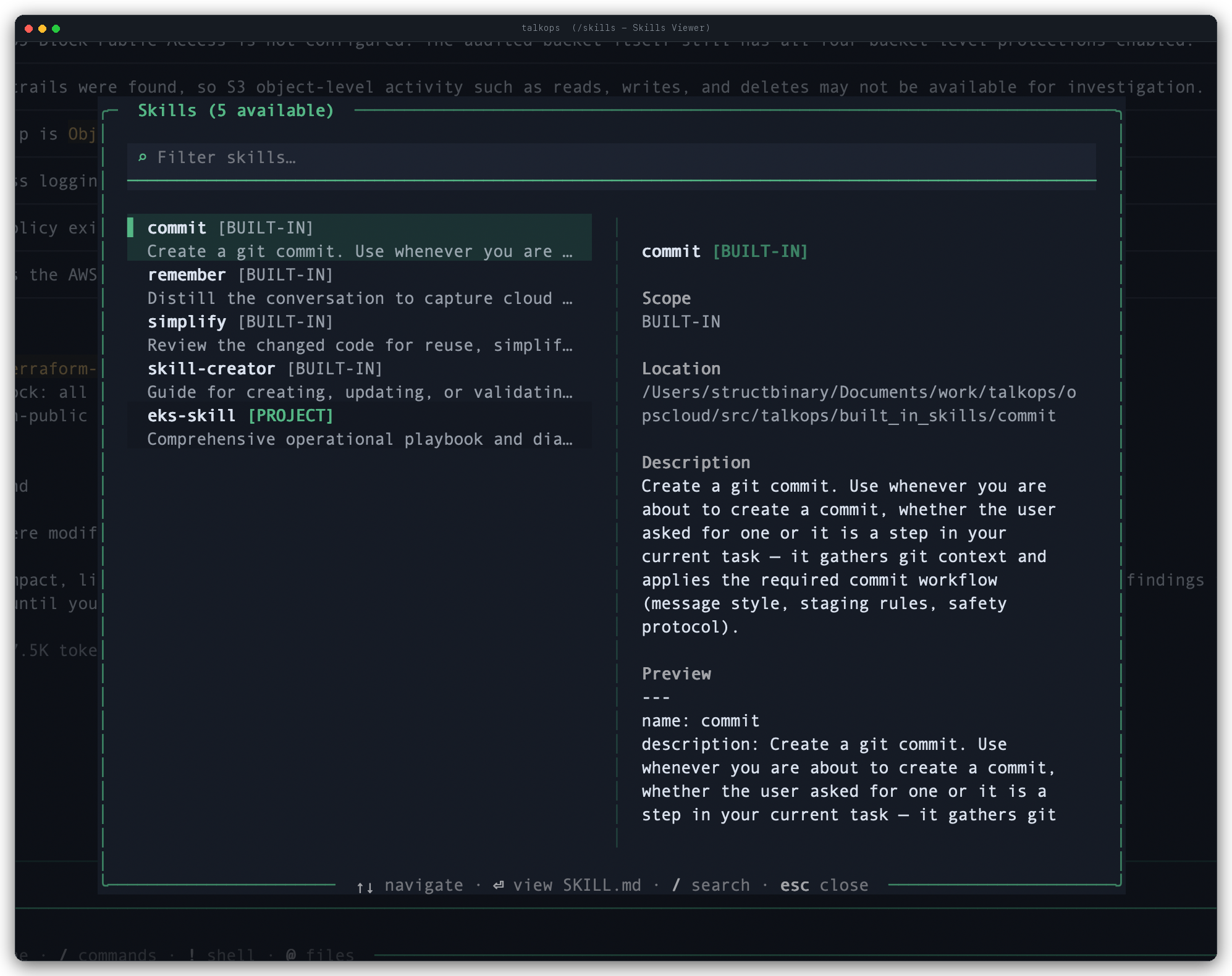
/skills | Opens the interactive two-pane Skills Viewer modal—filter skills on the left, inspect scope, location, description, and preview on the right, and press Enter to read the full SKILL.md playbook. |
/tools | Prints a summary of all discovered skills, core built-in tools, and connected MCP server tools in the chat view. |
/skill:<name> [args] | Explicitly invokes a skill by name (for example, /skill:commit, /skill:simplify, or /skill:eks-skill check node groups). |
/skill-creator [args] | Launches the built-in interactive Skill Creator assistant to design, scaffold, or refine a skill right from your conversation. |
From the CLI at Launch (-s / --skill)
You can pre-load and invoke a skill when launching an interactive or non-interactive session:
# Launch an interactive session with a skill pre-loaded
talkops -s eks-runbook

# Run a headless one-shot task using a specific skill
talkops -s eks-runbook -n "Audit all deployments in k8s/prod/ for missing resource limits"
Creating Your Own Skill
You can create a new skill either conversationally in the TUI (by running /skill-creator or /remember) or from your terminal with talkops skills create.
1. Scaffold a Skill Directory
# Create a personal skill (available across all your projects)
talkops skills create eks-runbook

# Or create a project skill inside the current repo (.talkops/skills/eks-runbook)
talkops skills create eks-runbook --project
A skill directory can include a required SKILL.md file along with optional supporting folders:
eks-runbook/
├── SKILL.md          # Required — YAML frontmatter + step-by-step instructions
├── scripts/          # Optional — executable Python/Bash helper scripts
├── references/       # Optional — detailed docs, schemas, or cloud policies loaded on demand
└── assets/           # Optional — starter templates or manifests copied into outputs
2. Write the SKILL.md Playbook
Every SKILL.md starts with YAML frontmatter (name and description). Because the agent uses description to decide when to activate the skill, make sure it clearly states what the skill does and when to trigger it:
---
name: eks-runbook
description: "Diagnose and remediate AWS EKS node and pod issues, and audit Kubernetes manifests against production readiness standards. Use when troubleshooting EKS clusters or reviewing k8s YAML files."
---

# EKS Production Runbook

## Operational Procedure
1. Verify the active AWS profile and Kubernetes context before running cluster commands.
2. When authoring or reviewing workloads:
   - Define explicit CPU and memory `requests` and `limits`.
   - Configure `readinessProbe` and `livenessProbe` on all long-running services.
   - Enforce `runAsNonRoot: true` in the pod `securityContext`.
3. For node-level networking issues, read [VPC_CNI.md](https://github.com/talkops-ai/talkops/blob/main/docs/talkops-docs/references/VPC_CNI.md) before modifying daemonsets.
Managing Skills from the CLI (talkops skills)
Use the talkops skills (or talkops skill) CLI command suite to inspect and manage skills from your terminal:
# List all discovered user, project, plugin, and built-in skills
talkops skills list

# List only project-scoped skills in the current repository
talkops skills list --project

# View metadata, path, and full instructions for a specific skill
talkops skills info eks-runbook

# Delete a skill (add --project for project skills, or --force to skip confirmation)
talkops skills delete eks-runbook
Managing Trusted External Skill Directories
To prevent untrusted symlinks inside a skill folder from reading arbitrary files outside your standard skill directories, TalkOps verifies that every SKILL.md resolves inside a trusted root. If a skill points to an external directory, TalkOps prompts you once for approval and records your decision in ~/.talkops/.state/skill_trust.json.
You can inspect or revoke trusted external skill directories at any time:
# List external directories you have approved for skills
talkops skills trust list

# Revoke trust for a specific external directory
talkops skills trust revoke /path/to/external/skills

# Clear all trusted external skill directories
talkops skills trust clear
See Also
- Custom Commands — Define parameterized
/commandshortcuts with inline shell execution. - Subagents — Delegate isolated multi-step tasks to specialized subagents.
- Plugins & Marketplaces — Install full-featured domain plugins that bundle skills, subagents, and MCP servers.
- Configuration Overview — Manage your global and project settings.