Plugins and Marketplaces
Extend TalkOps with specialist subagents, domain skill packs, MCP servers, and slash commands from official or private marketplaces
Plugins package reusable subagents, skills, MCP servers, and custom commands into versioned bundles that you can install globally for your user account or scope to a specific repository.
Out of the box, TalkOps connects to the official TalkOps DevOps Plugin Marketplace (talkops-ai/devops-plugins) and also supports private team repositories, Git subdirectories, HTTP catalogs, and workspace-local plugin folders.
Only install plugins and marketplaces from sources you trust. Enabled plugins can add instructions, register custom commands, and launch MCP server processes with your local user permissions.
How Plugins Work
TalkOps automatically classifies each plugin based on the components inside its package directory:
| Plugin Type | Package Contents | How It Attaches in TalkOps | Examples |
|---|---|---|---|
| Agent Plugin | Contains one or more subagent definitions in agents/*.md (plus optional skills/ and .mcp.json) | Registers a dedicated specialist subagent (invocable via /agent <name> or automatic task delegation) with its own scoped skills, isolated memory, and dedicated MCP servers | aws-sre-agent, aws-finops-engineer, aws-iac-engineer, aws-platform-engineer |
| Skill Pack (Vertical Plugin) | Contains domain skills/ and/or commands/ without agents/ or .mcp.json | Attaches domain skills and slash commands directly to your main TalkOps assistant | aws-infrastructure-as-code, aws-observability, aws-security-identity, aws-cost-optimization |
| Integration (Partner Plugin) | Bundles MCP servers (.mcp.json or mcpServers) and skills without a separate subagent | Connects external vendor tools and domain skills to the main agent | terraform, third-party vendor toolkits |
Official TalkOps DevOps Plugin Marketplace
TalkOps ships with the official talkops-devops-plugins marketplace (talkops-ai/devops-plugins) pre-configured, providing 40+ cloud engineering subagents and domain skill packs:
- Specialist AWS Subagents:
aws-sre-agent— Investigates CloudWatch alarms, correlates X-Ray traces, filters log streams, and diagnoses incident root causes.aws-finops-engineer— Audits AWS spend, identifies idle resources and unattached EBS volumes, analyzes Savings Plans, and proposes cost optimizations.aws-iac-engineer— Architects, validates, and troubleshoots Terraform, OpenTofu, AWS CDK, and CloudFormation stacks.aws-platform-engineer— Designs and operates EKS clusters, VPC topologies, Karpenter autoscaling, and platform CI/CD pipelines.aws-cloud-security-engineer— Audits IAM policies for least privilege, triages GuardDuty and Security Hub findings, and reviews encryption controls.aws-solutions-architect— Evaluates multi-AZ/multi-region resilience, Well-Architected trade-offs, and cloud migration patterns.aws-agentcore-engineer— Builds, deploys, and debugs Amazon Bedrock AgentCore runtimes, gateways, and memory integrations.aws-data-engineer,aws-devsecops-engineer, andaws-startup-advisor.
- Domain Skill Packs:
aws-infrastructure-as-code,aws-observability,aws-security-identity,aws-cost-optimization,aws-well-architected,aws-serverless-eda,aws-containers-eks,aws-networking-edge, andterraform.
Managing Plugins Interactively (/plugins)
Run /plugins inside any interactive talkops session to open the full-screen Plugins manager modal:
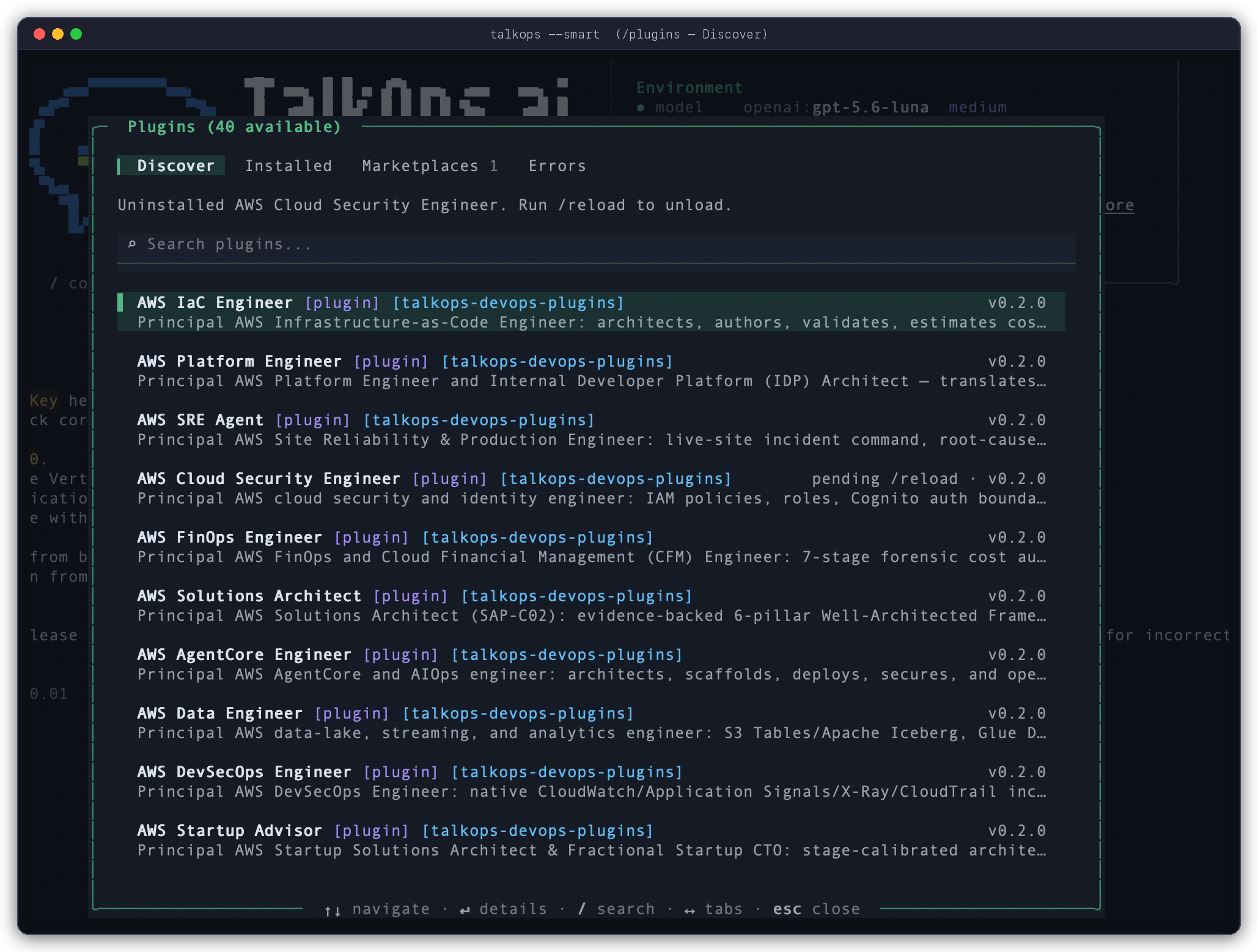
The modal is organized into four tabs (switch with Tab, ←, or →):
- Discover — Browse and search (
/to filter) all plugins available across your registered marketplaces. PressEnteron any plugin to inspect its description, bundled skills, subagents, and MCP servers and choose an installation scope:- Install for you (
userscope) — Available across all your workspaces. - Install for all collaborators on this repository (
projectscope) — Saved to<repo>/.talkops/settings.jsonfor your team. - Install for you, in this repo only (
localscope) — Saved to<repo>/.talkops/settings.local.json(excluded from Git).
- Install for you (
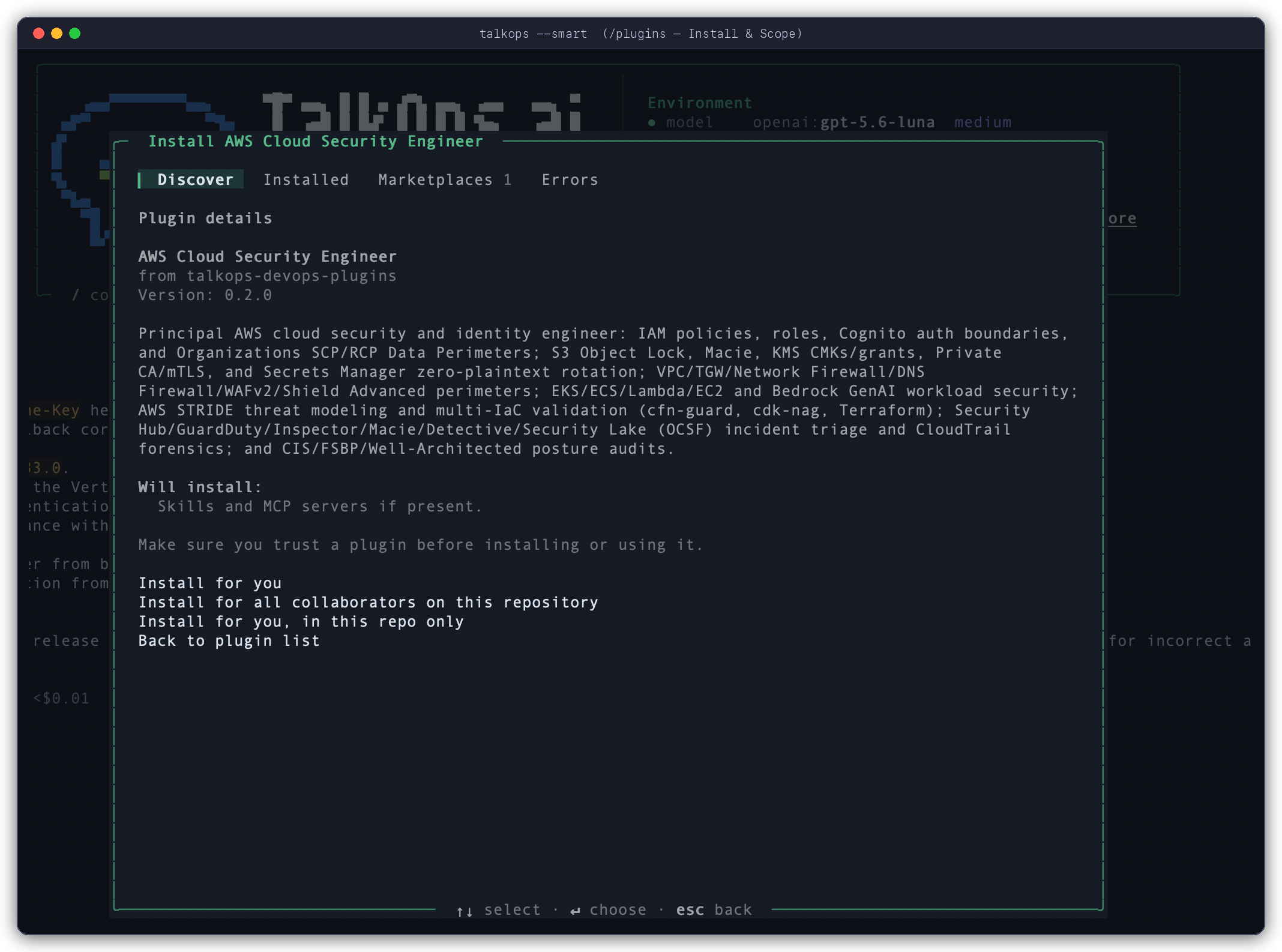
- Installed — View plugins installed in your user, project, or local scope. Press
Spaceto quick-toggle a plugin on or off, or pressEnterto change its scope or uninstall it. - Marketplaces — Inspect registered marketplace catalogs, refresh a catalog, or add a new marketplace source (GitHub
owner/repo, Git HTTPS URL,marketplace.jsonURL, or local directory). - Errors — Inspect diagnostic details if a plugin manifest, skill, or MCP server fails validation.
When you close the modal after installing, enabling, or disabling a plugin, TalkOps prompts you to reload the active session immediately (or you can run /reload at any time).
You can also run CLI subcommands directly from the TUI prompt—for example, /plugins list, /plugins search finops, or /plugins install aws-sre-agent.
Managing Plugins from the CLI
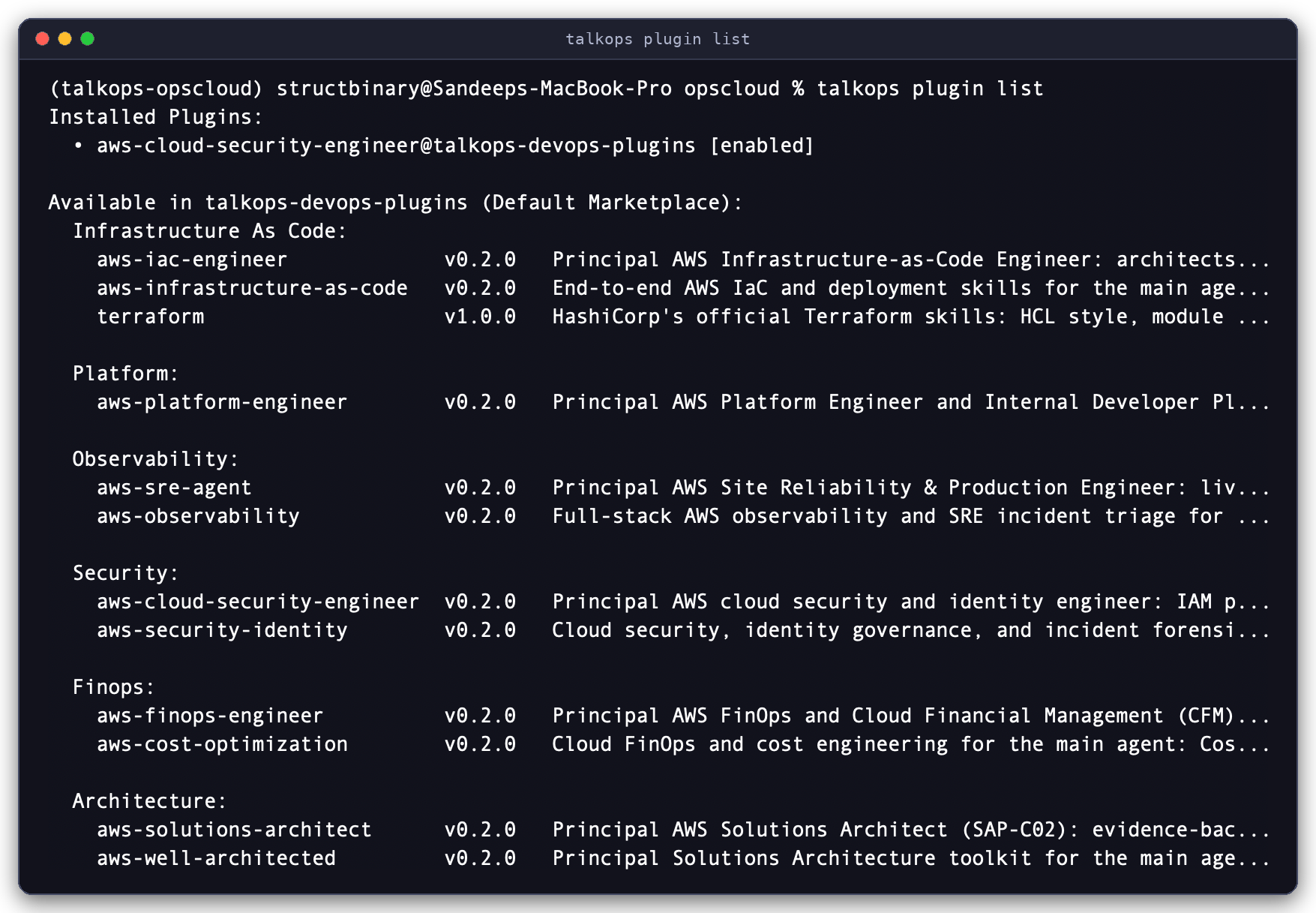
For terminal workflows, onboarding scripts, or CI setup, use talkops plugin (or its alias talkops plugins):
# List installed plugins and browse available marketplace plugins
talkops plugin list

# Search marketplace catalogs by keyword
talkops plugin search finops

# Install a plugin (defaults to --scope user)
talkops plugin install aws-sre-agent
talkops plugin install aws-iac-engineer --scope project
talkops plugin install aws-observability --scope local

# Disable or re-enable an installed plugin without deleting its cached files
talkops plugin disable aws-iac-engineer --scope project
talkops plugin enable aws-iac-engineer --scope project

# Re-sync installed plugins from their marketplace sources
talkops plugin refresh

# Uninstall a plugin from a specific scope (or omit --scope to remove from all scopes)
talkops plugin uninstall aws-iac-engineer --scope project
talkops plugin uninstall aws-sre-agent
Managing Marketplace Sources from the CLI
# Add a GitHub repository (optionally pinned to a branch or tag with @ref)
talkops plugin marketplace add talkops-ai/devops-plugins
talkops plugin marketplace add my-org/internal-talkops-plugins@main

# Add a Git URL or a local marketplace directory
talkops plugin marketplace add https://github.com/my-org/cloud-plugins.git#v1.2.0
talkops plugin marketplace add ./team-marketplace

# List, refresh, or remove marketplaces
talkops plugin marketplace list
talkops plugin marketplace refresh
talkops plugin marketplace remove internal-talkops-plugins
Private GitHub Repositories: When cloning or refreshing a GitHub marketplace (or a GitHub-hosted plugin source), TalkOps automatically authenticates with GITHUB_PERSONAL_ACCESS_TOKEN or GITHUB_TOKEN if present in your environment, and seamlessly falls back to unauthenticated access for public repositories.
Installation Scopes and Workspace Isolation
TalkOps isolates workspace plugins so that specialist agents, MCP servers, and skills installed for one repository never leak into unrelated projects.
Scope Comparison
| Scope | CLI Flag | Settings File | Behavior & Git Tracking |
|---|---|---|---|
| User (Global) | --scope user (default) | ~/.talkops/settings.json | Active across all workspaces for your user account unless explicitly disabled in a workspace. |
| Project (Shared) | --scope project | <repo>/.talkops/settings.json | Active only inside <repo>. Commit .talkops/settings.json so teammates use the same plugin set. |
| Local (Repo-Private) | --scope local | <repo>/.talkops/settings.local.json | Active only inside <repo>. TalkOps automatically adds .talkops/settings.local.json to <repo>/.git/info/exclude so it stays out of Git status. |
| Workspace Directory | Placed in repo tree | <repo>/.talkops/plugins/<name><repo>/.agents/plugins/<name><repo>/plugins/<name> | Discovered automatically when running inside <repo>. Ideal for developing or versioning custom plugins alongside your infrastructure code. |
Precedence and Overrides (local > project > user)
- Shared Cache, Scoped Activation:
Marketplace plugins are downloaded once into
~/.talkops/plugins/cache/<marketplace>/<plugin>/<version>and tracked per scope in~/.talkops/.state/installed_plugins.json. Installing a plugin with--scope projectin Repo A enables it only in Repo A—when you switch to Repo B, Repo A's project plugins remain completely inactive. - Overriding a Global Plugin in a Specific Repo:
Because enablement merges in order
user$\rightarrow$project$\rightarrow$local, you can keep a plugin installed globally for your user account while muting it in a specific repository:talkops plugin disable aws-finops-engineer --scope local - Declarative Workspace
plugins.json: A repository can also load plugins from relative directory paths or exclude specific global plugins via<repo>/.talkops/plugins.json(or<repo>/.agents/plugins.json):{
"entries": [
"../shared-ops-plugins/eks-diagnostics"
],
"exclude": [
"aws-startup-advisor"
]
}
Creating a Plugin
A TalkOps plugin is a directory containing a manifest file (plugin.json) and any combination of agents/, skills/, commands/, and .mcp.json.
Directory Layout
TalkOps discovers components automatically by directory convention—even if you don't list every path explicitly in plugin.json:
aws-finops-engineer/
├── .talkops-plugin/
│   └── plugin.json              # Plugin manifest (or place plugin.json at the root)
├── agents/
│   └── aws-finops-engineer.md   # Specialist subagent definition (YAML frontmatter + prompt)
├── skills/
│   ├── aws-cost-optimization/
│   │   └── SKILL.md             # Domain skill instructions
│   └── aws-billing-audit/
│       └── SKILL.md
├── commands/
│   └── cost-report.md           # Custom /cost-report slash command
└── .mcp.json                    # MCP servers bundled with the plugin
Cross-Tool Manifest Compatibility: TalkOps checks for the plugin manifest in .claude-plugin/plugin.json, .talkops-plugin/plugin.json, .agents-plugin/plugin.json, .codex-plugin/plugin.json, and plugin.json at the plugin root.
The plugin.json Manifest
{
  "name": "aws-finops-engineer",
  "displayName": "AWS FinOps Engineer",
  "version": "1.0.0",
  "description": "Cloud financial management, idle resource discovery, and Savings Plans optimization",
  "author": {
    "name": "TalkOps AI"
  },
  "skills": "./skills",
  "agents": [
    "./agents/aws-finops-engineer.md"
  ],
  "commands": "./commands",
  "mcpServers": "./.mcp.json"
}
| Field | Type | Description |
|---|---|---|
name | string | Required. Unique kebab-case identifier for the plugin. |
displayName | string | Optional human-friendly title shown in the /plugins UI (also accepts display_name). |
version | string | Semantic version string (used for cache directory versioning). |
description | string | Summary shown in /plugins and talkops plugin list. |
author | string | object | Author name ("Platform Team") or object ({"name": "Platform Team"}). |
skills | string | list[str] | Relative ./ path(s) to skill directories. Defaults to auto-discovering ./skills/ and root ./SKILL.md. |
agents | string | list[str] | Relative ./ path(s) to .md subagent files or directories. Defaults to auto-discovering ./agents/*.md. |
commands | string | list[str] | Relative ./ path(s) to .md command files or directories. Defaults to auto-discovering ./commands/. |
mcpServers | string | dict | list | Relative ./ path to an MCP config file (such as ./.mcp.json) or an inline mcpServers object. |
Path Variables inside Plugins
When authoring .mcp.json configurations, subagent prompts, or custom commands inside a plugin, use built-in environment variables instead of hardcoded paths:
| Variable | Resolves To |
|---|---|
${PLUGIN_ROOT} / ${CLAUDE_PLUGIN_ROOT} / ${TALKOPS_PLUGIN_ROOT} | Absolute path to the installed plugin's root directory |
${PLUGIN_DATA} / ${CLAUDE_PLUGIN_DATA} / ${TALKOPS_PLUGIN_DATA} | Persistent data directory for the plugin (~/.talkops/plugins/data/<plugin-id>), preserved across version updates |
${PROJECT_DIR} / ${CLAUDE_PROJECT_DIR} / ${TALKOPS_PROJECT_DIR} | Absolute path to the active workspace root |
For example, in a plugin's .mcp.json:
{
  "mcpServers": {
    "cost-analyzer": {
      "command": "uv",
      "args": ["run", "--directory", "${PLUGIN_ROOT}/servers/cost", "python", "server.py"],
      "env": {
        "CACHE_DIR": "${PLUGIN_DATA}/cache"
      }
    }
  }
}
Creating a Marketplace
A marketplace is any Git repository, HTTP endpoint, or directory that provides a marketplace.json catalog (placed at .claude-plugin/marketplace.json, .agents/plugins/marketplace.json, or marketplace.json at the root).
Example marketplace.json
{
  "name": "acme-cloud-plugins",
  "owner": {
    "name": "Acme Platform Engineering"
  },
  "metadata": {
    "description": "Internal SRE subagents and Kubernetes runbooks",
    "version": "1.0.0",
    "pluginRoot": "./plugins"
  },
  "plugins": [
    {
      "name": "eks-sre-agent",
      "source": "./plugins/eks-sre-agent",
      "description": "Diagnoses EKS pod evictions, CoreDNS latency, and Karpenter node provisioning",
      "version": "1.2.0",
      "category": "SRE",
      "tags": ["eks", "kubernetes", "sre"]
    },
    {
      "name": "rds-audit",
      "source": {
        "source": "github",
        "repo": "acme-corp/rds-audit-plugin",
        "ref": "v1.0.0"
      },
      "description": "Audits RDS parameter groups, backups, and Performance Insights metrics"
    }
  ]
}
Supported Plugin source Formats in marketplace.json
Each entry in "plugins" can point to a relative path inside the marketplace or an external Git repository:
- Relative path inside the marketplace:
"source": "./plugins/eks-sre-agent"(or{"source": "local", "path": "./plugins/eks-sre-agent"}) - GitHub repository:
{"source": "github", "repo": "owner/repo", "ref": "main", "path": "optional/subdir"} - Git subdirectory (sparse checkout):
{"source": "git-subdir", "url": "https://github.com/owner/monorepo.git", "path": "plugins/my-plugin", "ref": "main"} - Git URL:
{"source": "url", "url": "https://gitlab.example.com/ops/my-plugin.git", "ref": "v1.0.0"}
Testing Your Marketplace Locally
# Register your local marketplace folder and install a plugin from it
talkops plugin marketplace add ./acme-cloud-plugins
talkops plugin install eks-sre-agent@acme-cloud-plugins
Related Documentation
- Subagents — How specialist subagents work and how to invoke or author
agents/*.mdfiles. - Memory and Skills — Authoring
SKILL.mddomain runbooks and progressive disclosure. - Custom Commands — Creating reusable
/commandMarkdown templates. - MCP Tools — Configuring
.mcp.jsonservers and tool permissions. - CLI & TUI Reference — Complete flag and slash-command reference.