Model Providers
TalkOps is model-agnostic and supports over 25 cloud, API, and local LLM providers out of the box. You can switch models mid-conversation, adjust reasoning depth on the fly, or let Smart Mode route each step across a 3-tier model pool.
All models in TalkOps use the <provider>:<model> naming format—for example:
anthropic:claude-sonnet-4-5openai:gpt-5.2google_genai:gemini-2.5-proollama:qwen3:8b
Supported Model Providers
| Provider | Prefix | Environment Variable / Auth Source | Example <provider>:<model> |
|---|---|---|---|
| Anthropic | anthropic | ANTHROPIC_API_KEY | anthropic:claude-sonnet-4-5 |
| OpenAI | openai | OPENAI_API_KEY | openai:gpt-5.2 |
| OpenAI Codex (ChatGPT Subscription) | openai_codex | OPENAI_CODEX_ACCESS_TOKEN (or ChatGPT OAuth) | openai_codex:gpt-5.3-codex |
| Google Gemini | google_genai | GOOGLE_API_KEY | google_genai:gemini-2.5-pro |
| Google Vertex AI | google_vertexai | GOOGLE_CLOUD_PROJECT (or GOOGLE_APPLICATION_CREDENTIALS) | google_vertexai:gemini-2.5-pro |
| Anthropic on Vertex AI | google_anthropic_vertex | GOOGLE_CLOUD_PROJECT (or GOOGLE_APPLICATION_CREDENTIALS) | google_anthropic_vertex:claude-sonnet-4-5@20250929 |
| AWS Bedrock | bedrock | AWS Credentials (AWS_PROFILE / AWS_REGION) | bedrock:us.anthropic.claude-sonnet-4-5-20250929-v1:0 |
| Azure OpenAI | azure_openai | AZURE_OPENAI_API_KEY + AZURE_OPENAI_ENDPOINT | azure_openai:gpt-4.1 |
| DeepSeek | deepseek | DEEPSEEK_API_KEY | deepseek:deepseek-reasoner |
| Groq | groq | GROQ_API_KEY | groq:llama-3.3-70b-versatile |
| OpenRouter | openrouter | OPENROUTER_API_KEY | openrouter:anthropic/claude-sonnet-4-5 |
| Mistral AI | mistralai | MISTRAL_API_KEY | mistralai:mistral-large-latest |
| xAI (Grok) | xai | XAI_API_KEY | xai:grok-4 |
| Fireworks AI | fireworks | FIREWORKS_API_KEY | fireworks:accounts/fireworks/models/deepseek-v3 |
| Together AI | together | TOGETHER_API_KEY | together:meta-llama/Llama-3.3-70B-Instruct-Turbo |
| Cerebras | cerebras | CEREBRAS_API_KEY | cerebras:llama-3.3-70b |
| SambaNova | sambanova | SAMBANOVA_API_KEY | sambanova:Meta-Llama-3.3-70B-Instruct |
| Cohere | cohere | COHERE_API_KEY | cohere:command-a-03-2025 |
| Perplexity | perplexity | PPLX_API_KEY | perplexity:sonar-reasoning-pro |
| NVIDIA NIM | nvidia | NVIDIA_API_KEY | nvidia:meta/llama-3.3-70b-instruct |
| Baseten | baseten | BASETEN_API_KEY | baseten:deepseek-ai/DeepSeek-R1 |
| Hugging Face | huggingface | HUGGINGFACEHUB_API_TOKEN | huggingface:Qwen/Qwen2.5-Coder-32B-Instruct |
| IBM watsonx.ai | ibm | WATSONX_APIKEY | ibm:ibm/granite-3-8b-instruct |
| LiteLLM Proxy | litellm | LITELLM_API_KEY | litellm:gpt-4o |
| Ollama (Local) | ollama | Local Ollama daemon (OLLAMA_HOST, default http://localhost:11434) | ollama:qwen3:8b |
Switching Models & Setting a Default
Inside the TUI (/model)
Use the /model slash command to browse or switch models without losing your current conversation history:
| Command | Description |
|---|---|
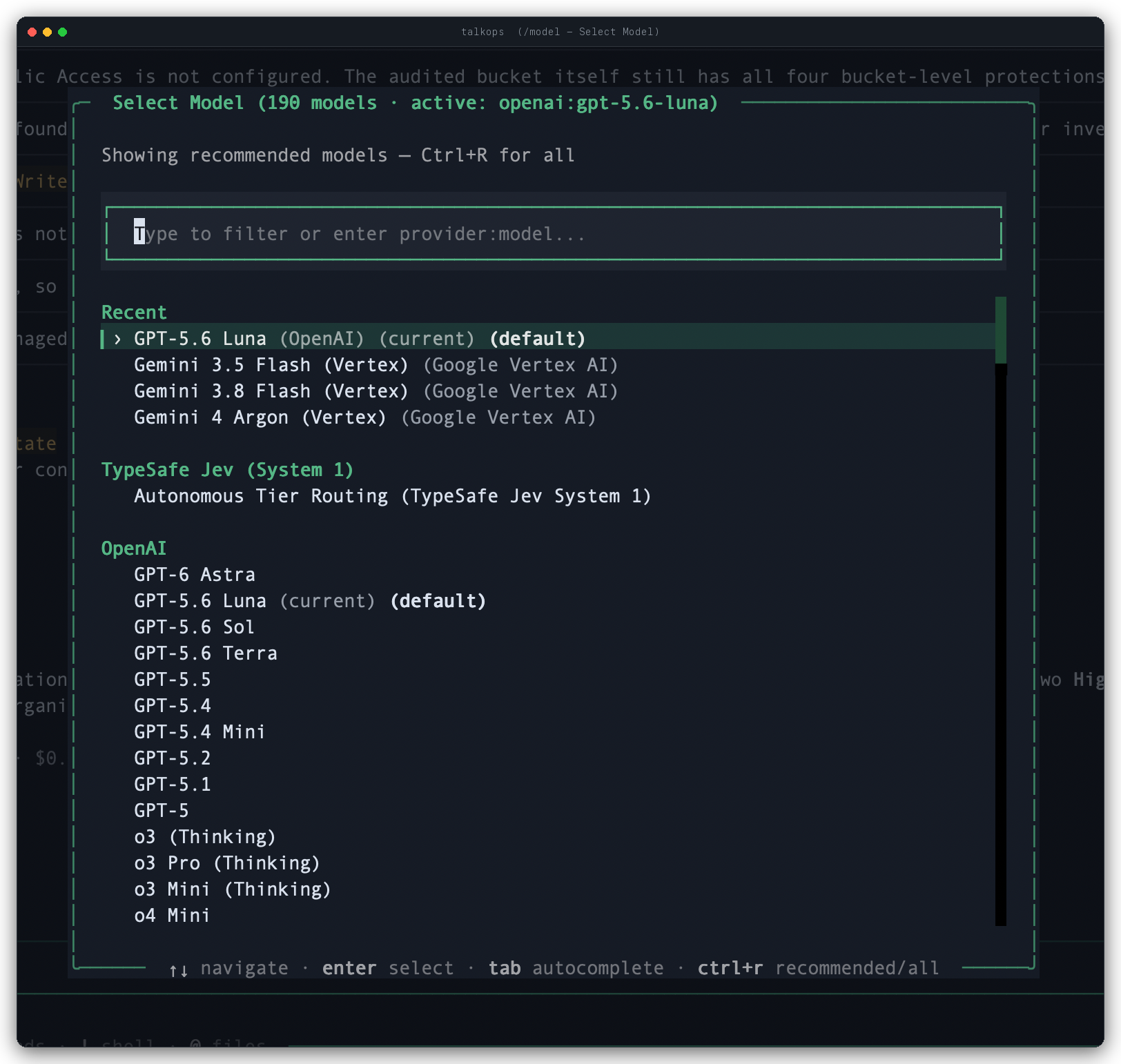
/model | Opens the interactive Select Model modal, where you can search by keyword, press Ctrl+R to toggle between recommended models and the full catalog, and pick a model (or select Autonomous Tier Routing). |
/model <provider:model> | Immediately switches your active session to the specified model (for example, /model openai:gpt-5.2). |
/model --default <provider:model> | Saves the model as your persistent startup default in ~/.talkops/config.toml under [models].default. |
/model --default --clear | Clears your saved startup default from ~/.talkops/config.toml. |
From the CLI at Launch (-M / --model)
To start a session or run a one-shot prompt with a specific model, pass -M (or --model):
# Start an interactive TUI session with Claude Opus 4.6
talkops -M anthropic:claude-opus-4-6

# Run a single non-interactive command with Gemini 2.5 Flash
talkops -M google_genai:gemini-2.5-flash -n "Check which pods are restarting in the staging namespace"
Reasoning Effort & Fast Mode
Adjusting Reasoning Depth (/effort)
For models that support extended thinking or reasoning budgets (such as Claude 4.5/4.6, OpenAI o-series / GPT-5, Gemini 2.5, and DeepSeek R1), you can control how much reasoning effort the model spends on each turn:
| Command | Description |
|---|---|
/effort | Opens the interactive Reasoning Effort selector modal. |
/effort low | Minimal thinking time for fast, straightforward answers. |
/effort medium | Balanced reasoning depth and speed (recommended for everyday work). |
/effort high | Deep reasoning for complex infrastructure debugging and multi-step planning. |
/effort max | Maximum extended thinking budget for the hardest architectural or root-cause analysis tasks. |
/effort off (or /effort clear) | Disables custom effort overrides and uses the model's standard default. |
Toggling Fast Mode (/fast)
When you need quick answers or rapid command lookups, toggle Fast Mode by running /fast (or pressing Ctrl+F):
- Fast Mode ON (
⚡) — Temporarily switches your session to your provider's fast model (such asclaude-haiku-4-5,gpt-5-mini, orgemini-2.5-flash) withlowreasoning effort. - Fast Mode OFF — Restores your previous primary model and reasoning effort level.
Smart Mode & the 3-Tier Agent Model Pool (/pool)
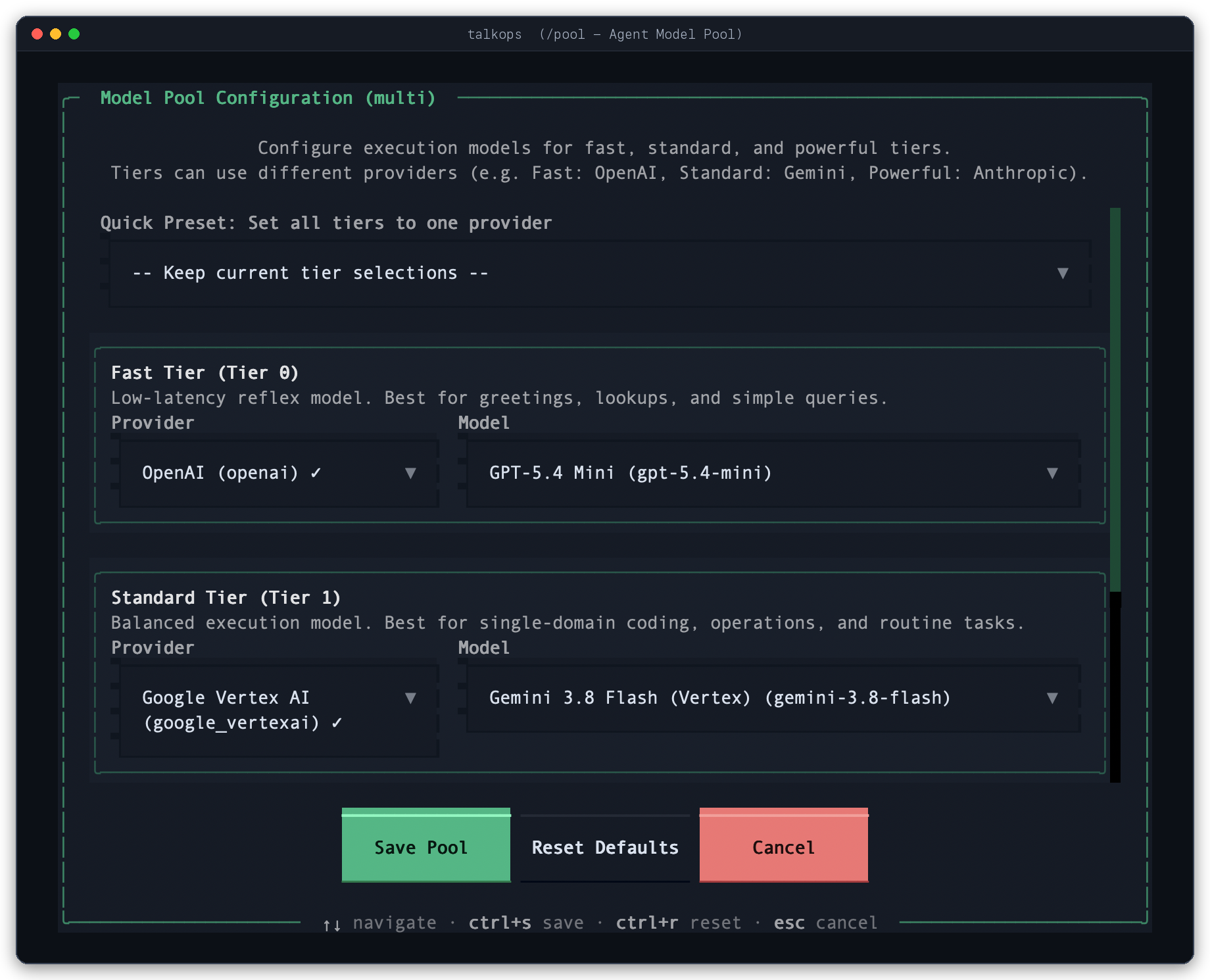
When you enable Smart Mode (/approval smart) with a TYPESAFE_API_KEY configured, TalkOps can automatically route each step of your workflow across a 3-tier model pool based on task complexity:
- Fast (
fast) — Lightweight, low-latency model for quick status checks, log inspection, and simple formatting. - Standard (
standard) — Balanced model for everyday infrastructure queries, YAML/Terraform edits, and tool calls. - Powerful (
powerful) — Frontier reasoning model for complex root-cause analysis, multi-service architecture planning, and high-stakes changes.
Managing Your Model Pool
You can customize the 3-tier pool interactively in the TUI or in ~/.talkops/config.toml:
# Open the interactive Configure Agent Model Pool modal
/pool

# View your active Fast, Standard, and Powerful tier assignments
/pool status

# Assign specific models (even across different providers) from the chat bar
/pool set fast=google_genai:gemini-2.5-flash standard=anthropic:claude-sonnet-4-5 powerful=openai:gpt-5.2

# Reset back to automatic tier discovery
/pool clear
Or define it permanently in ~/.talkops/config.toml:
[agent_pool]
provider = "multi"
fast = "google_genai:gemini-2.5-flash"
standard = "anthropic:claude-sonnet-4-5"
powerful = "anthropic:claude-opus-4-6"
Running Local & Custom Endpoints
Local Models with Ollama
TalkOps works with local models running through Ollama without requiring an API key:
# 1. Pull a tool-capable model in Ollama
ollama pull qwen3:8b

# 2. Launch TalkOps with your local model
talkops -M ollama:qwen3:8b
If your Ollama server runs on another host or port, set OLLAMA_HOST=http://your-host:11434 or save it with talkops auth set ollama --base-url http://your-host:11434.
Custom OpenAI-Compatible Gateways
If your organization hosts models behind vLLM, LM Studio, or an internal OpenAI-compatible proxy, add a custom provider entry to ~/.talkops/config.toml:
[models.providers.vllm_local]
class_path = "langchain_openai:ChatOpenAI"
base_url = "http://localhost:8000/v1"
api_key_env = "VLLM_API_KEY"
models = ["Qwen/Qwen2.5-Coder-32B-Instruct"]
You can then switch to it anytime with /model vllm_local:Qwen/Qwen2.5-Coder-32B-Instruct.